daemon rewrite+ add some
[TOC]
This repo covers various topics that are prerequisites for system programming.We begin by introducing system calls and detailing the steps that occur during their execution. We then consider library functions and how they differ from system calls, and couple this with a description of the (GNU) C library. Whenever we make a system call or call a library function, we should always check the return status of the call in order to determine if it was successful. We describe how to perform such checks, and present a set of functions that are used in most of the example programs in this book to diagnose errors from system calls and library functions.
All system calls for performing I/O refer to open files using a file descriptor, a (usually small) nonnegative integer. File descriptors are used to refer to all types of open files, including pipes, FIFOs, sockets, terminals, devices, and regular files. Each process has its own set of file descriptors. Most of the programs uses three standard file descriptors.
Table: Standard File Descriptor
| File descriptor | Purpose | POSIX name | stdio stream |
|---|---|---|---|
| 0 | standard input | STDIN_FILENO | stdin |
| 1 | standard output | STDOUT_FILENO | stdout |
| 2 | standars error | STDERR_FILENO | srderr |
Have a quick look at /usr/include/unistd.h if you forget them. The following are the four system calls for performing file I/O:
The open() system call either opens an existing file or creates and opens a new file.
#include <sys/stat.h>
#include <fcntl.h>

int open(const char * pathname , int flags , ... /* mode_t mode */);
//Returns file descriptor on success, or –1 on error
The first argument pathname is the name/path of file to be opened. If the pathname is the symbolic link, it is dereferenced.
The flag argument is a bit mask that specifies the access mode for the file,using one of the constants shown in below table:
When open() is used to create a new file, the mode bit-mask argument specifies the permissions to be placed on the file.(0666,0421)
4-->read(100)
2-->write(010)
1-->execute(001)
Table: Values for the flags argument of open()
Table: File access mode
These access mode can be retrieved using fnctl() F_GETFL operation.
| Flag | Description |
|---|---|
| O_RDONLY | Open for reading only |
| O_WRONLY | Open for writing only |
| O_RDWR | Open for reading and writing |
Table:File creation flags
They control various aspects of the behavior of the open() call, as well as options for subsequent I/O operations. These flags can’t be retrieved or changed.
| Flag | Description |
|---|---|
| O_CLOEXEC | Set the close-on-exec flag (since Linux 2.6.23) |
| O_CREAT | Create file if it doesn’t already exist |
| O_DIRECT | File I/O bypasses buffer cache |
| O_DIRECTORY | Fail if pathname is not a directory |
| O_EXCL | With O_CREAT : create file exclusively |
| O_LARGEFILE | Used on 32-bit systems to open large files |
| O_NOATIME | Don’t update file last access time on read() (since Linux 2.6.8) |
| O_NOCTTY | Don’t let pathname become the controlling terminal |
| O_NOFOLLOW | Don’t dereference symbolic links |
| O_TRUNC | Truncate existing file to zero length |
Table: Open file status flag
These can be retrieved and modified using the fcntl() F_GETFL and F_SETFL operations. These flags are sometimes simply called the file status flags.
| Flag | Description |
|---|---|
| O_APPEND | Writes are always appended to end of file |
| O_ASYNC | Generate a signal when I/O is possible |
| O_DSYNC | Provide synchronized I/O data integrity (since Linux 2.6.33) |
| O_NONBLOCK | Open in nonblocking mode |
| O_SYNC | Make file writes synchronous |
The read() system call reads data from the open file referred to by the descriptor fd.
#include <unistd.h>

ssize_t read(int fd , void * buffer , size_t count );
//Returns number of bytes read, 0 on EOF, or –1 on error
fd argument is the return of open() system call. count argument specifies the maximun number of bytes to read. size_t is unsigned integer type. The buffer argument supplies the the address of the memory buffer into which the input data is to be placed. This buffer must be at least count bytes long.
The write() system call writes data to an open file.
#include <unistd.h>

ssize_t write(int fd, void * buffer , size_t count );
//Returns number of bytes written, or –1 on error
buffer argument is the address of the data to be written; count is the number of bytes to write from buffer; and fd is a file descriptor referring to the file to which data is to be written.
The close() system call closes an open file descriptor, freeing it for subsequent reuse by the process. When a process terminates, all of its open file descriptors are automatically closed.
#include <unistd.h>

int close(int fd );
//Returns 0 on success, or –1 on error
fd is the return value of open() system call.
The lseek() system call adjusts the file offset of the open file referred to by the file descriptor fd, according to the values specified in offset and whence.
#include <unistd.h>

off_t lseek(int fd , off_t offset , int whence );
//Returns new file offset if successful, or –1 on error
fd is the current file descriptor.off_t offset is the he amount (positive or negative) the byte offset is to be changed. The sign indicates whether the offset is to be moved forward (positive) or backward (negative).
offset argument specifies a value in bytes.
The whence argument indicates the base point from which offset is to be interpreted, and is one of the following values:
SEEK_SET :The start of the file
SEEK_CUR :The current file offset in the file
SEEK_END :The end of the file
We can’t apply lseek() to all types of files. Applying lseek() to a pipe, FIFO, socket, or terminal is not permitted; lseek() fails, with errno set to ESPIPE . On the other hand, it is possible to apply lseek() to devices where it is sensible to do so. For example, it is possible to seek to a specified location on a disk or tape device
Some examples of lseek() system call. lseek(fd,0,SEEK_SET); /Start of the file/ lseek(fd,0,SEEK_END); /Next byte after the end of the file/ lseek(fd,-1,SEEK_END); /Last byte of the file/ lseek(fd,-10,SEEK_CUR); /Ten bytes prior to current location/ lseek(fd,1000,SEEK_END); /1001 bytes past last byte of file/
Example :
#include<stdio.h>
#include<sys/stat.h>
#include<fcntl.h>
#include<unistd.h>
int main(){
	int fd;
	char buff[20];
	fd = open("lseekexample.txt",O_RDWR);
    // reading only 4bytes before lseek is applied.
	read(fd,buff,5);
	write(1,buff,5);
	printf("\n");
//place the pointer after 10bytes from start
	int f1 = lseek(fd,10,SEEK_CUR);
	printf("Pointer is at location %d\n",f1);
	//read and print after lseek
    read(fd,buff,4);
	write(1,buff,4);
}
Output:
$ ./lseekexample
hello
Pointer is at location 15
seek
Atomicity is a concept that we’ll encounter repeatedly when discussing the operation of system calls. All system calls are executed atomically. By this, we mean that the kernel guarantees that all of the steps in a system call are completed as a single operation, without being interrupted by another process or thread.
Atomicity is essential to the successful completion of some operations. In particular, it allows us to avoid race conditions (sometimes known as race hazards). A race condition is a situation where the result produced by two processes (or threads) operating on shared resources depends in an unexpected way on the relative order in which the processes gain access to the CPU(s).
#include <unistd.h>
#include <fcntl.h>

int fcntl(int fd, int cmd);
int fcntl(int fd, int cmd, long arg);
int fcntl(int fd, int cmd, struct flock *lock);
//Return on success depends on cmd, or –1 on error
fcntl() performs one of the operations described below on the open file descriptor fd. The operation is determined by cmd. The cmd argument can specify a wide range of operations. We examine some of them in the later section of Record Locking with fcntl() As indicated by the ellipsis, the third argument to fcntl() can be of different types, or it can be omitted. The kernel uses the value of the cmd argument to determine the data type (if any) to expect for this argument.
| Tag | Description |
|---|---|
| F_DUPFD | Find the lowest numbered available file descriptor greater than or equal to arg and make it be a copy of fd. This is different from dup2(2) which uses exactly the descriptor specified. |
| F_GETFD | Read the file descriptor flags. |
| F_SETFD | Set the file descriptor flags to the value specified by arg. |
| F_GETFL | Read the file status flags. |
A process is an instance of an executing program. In this process section, I elaborate on this definition and clarify the distinction between a program and a process. A program is a file containing a range of information that describes how to construct a process at run time. This information includes the following: a) Binary format identification: Each program file includes meta information describing the format of the executable file. This enables the kernel to interpret the remaining information in the file. Historically, two widely used formats for UNIX executable files were the original a.out (“assembler output”) format and the later, more sophisticated COFF (Common Object File Format). Now a days, most UNIX implementations (including Linux) employ the Executable and Linking Format (ELF), which provides a number of advantages over the older formats. b) Machine-language instructions: These encode the algorithm of the program. c) Program entry-point address: This identifies the location of the instruction at which execution of the program should commence. d) Data:The program file contains values used to initialize variables and also literal constants used by the program (e.g., strings). e) Symbol and relocation tables: These describe the locations and names of functions and variables within the program. These tables are used for a variety of purposes, including debugging and run-time symbol resolution (dynamic linking). f) Shared-library and dynamic-linking information: The program file includes fields listing the shared libraries that the program needs to use at run time and the pathname of the dynamic linker that should be used to load these libraries. g) Other information: The program file contains various other information that describes how to construct a process.
#include<stdio.h>
#include<stdlib.h>
#include<unistd.h>

int main(){
    int proc_id, parent_proc_id;
    char pause[5];
    proc_id = getpid(); //gives current proess id
    parent_proc_id = getppid();//gives process id of parent(akakrazy's bash)
    printf("Process id:%d\nparent id:%d\n",proc_id,parent_proc_id);
    printf("%s",system("ps aux | grep linux_pr"));
    fgets(pause,5,stdin);
}
A process can allocate memory by increasing the size of the heap, a variable size segment of contiguous virtual memory that begins just after the uninitialized data segment of a process and grows and shrinks as memory is allocated and freed. The current limit of the heap is referred to as the program break. To allocate memory, C programs normally use the malloc family of functions,which we describe shortly. However, we begin with a description of brk() and sbrk(), upon which the malloc functions are based.
The following example in c descripe the basic of pointer
#include<stdio.h>
#include<stdlib.h>
#include<string.h>

int main(){
    int a= 20;
    int * p  = &a;
    printf("Value at a %d\n",a);
    printf("Address of a: %p\n",&a);
    printf("Address of p: %p\n",p);
    printf("Value at p: %d\n",*p);
    int b = 14;
    *p = b;
      printf("Address of a: %p\n",&a);
    printf("Address of p: %p\n",p);
    printf("Value at p: %d\n",*p);
    printf("Value at a: %d\n",a);
}
Traditionally, the UNIX system has provided two system calls for manipulating the program break, and these are both available on Linux: brk() and sbrk(). Although these system calls are seldom used directly in programs, understanding them helps clarify how memory allocation works.
#include <unistd.h>
int brk(void * end_data_segment );
//Returns 0 on success, or –1 on error
void *sbrk(intptr_t increment );
//Returns previous program break on success, or (void *) –1 on error
The brk() system call sets the program break to the location specified by end_data_segment. Since virtual memory is allocated in units of pages, end_data_segment is effectively rounded up to the next page boundary.
A call to sbrk() adjusts the program break by adding increment to it. (On Linux, sbrk() is a library function implemented on top of brk().) The intptr_t type used to declare increment is an integer data type. On success, sbrk() returns the previous address of the program break. In other words, if we have increased the program break, then the return value is a pointer to the start of the newly allocated block of memory
The call sbrk(0) returns the current setting of the program break without changing it. This can be useful if we want to track the size of the heap, perhaps in order to monitor the behavior of a memory allocation package.
In general, C programs use the malloc family of functions to allocate and deallocate memory on the heap. These functions offer several advantages over brk() and sbrk().
The malloc() function allocates size bytes from the heap and returns a pointer to the start of the newly allocated block of memory. The allocated memory is not initialized.
include <stdlib.h>
void *malloc(size_t size );
//Returns pointer to allocated memory on success, or NULL on error
The free() function deallocates the block of memory pointed to by its ptr argument, which should be an address previously returned by malloc()
#include <stdlib.h>
void free(void * ptr );
Example for malloc() and free() in dynamic memory allocation.
#include<stdio.h>
#include<stdlib.h>
#include<string.h>

int main(){
    int finish;
    int n;
    printf("Enter the size of the array\n");
    scanf("%d",&n);
    for (int i = 0; i < n; i++)
    {
        int *A = (int *)malloc(10000*n);
        printf("Allocated:");
    	free(A);
    }

    scanf("%d",&finish);
	exit(1);
}
We can also use debugger to find out malloc portion in a binary file.
 akakrazy@kali:~/PWK/c_pro$ valgrind --trace-malloc=yes ./basic
==705448== Memcheck, a memory error detector
==705448== Copyright (C) 2002-2017, and GNU GPL'd, by Julian Seward et al.
==705448== Using Valgrind-3.16.1 and LibVEX; rerun with -h for copyright info
==705448== Command: ./basic
==705448==
--705448-- malloc(1024) = 0x4A2E040
Enter the size of the array
--705448-- malloc(1024) = 0x4A2E480
1
--705448-- malloc(10000) = 0x4A2E8C0
--705448-- free(0x4A2E8C0)
Allocated:2
--705448-- free(0x4A2E480)
--705448-- free(0x4A2E040)
==705448== HEAP SUMMARY:
==705448==     in use at exit: 0 bytes in 0 blocks
==705448==   total heap usage: 3 allocs, 3 frees, 12,048 bytes allocated
==705448==
==705448== All heap blocks were freed -- no leaks are possible
==705448==
==705448== For lists of detected and suppressed errors, rerun with: -s
==705448== ERROR SUMMARY: 0 errors from 0 contexts (suppressed: 0 from 0)
The primary purpose of user and group ID is to determine ownership of various system resources and to control the permission to process accesing to those resources.
The system password file, /etc/passwd contains one line for each user account on the system. Each line is composed of seven fields by colons(:). Example:
akakrazy:x:1000:1000:manojghimire,,,:/home/akakrazy:/usr/bin/zsh
FMore can be found on passwd manual page.
shadow is a file which contains the password information for the system's accounts and optional aging information.
This file must not be readable by regular users if password security is to be maintained.
Each line of this file contains 9 fields, separated by colons (“:”) Example:
share:$6$bXUUXaGogkDgNKD6$EV..4HuV5TN5sbHuuXKcWXbQm0caq6pJypQVvgq2SMwDaYm/nulk4k/6G8s24P6r0vSHaT4BVy/3NLudc7EkN.:18187:0:99999:7:::
More can be found on shadow(5) manual page.
Every process has a set of associated numeric user identifiers (UIDs) and group identifiers (GIDs). Sometimes, these are referred to as process credentials. These identifiers are as follows:
The real user ID and group ID identify the user and group to which the process belongs. As part of the login process, a login shell gets its real user and group IDs from the third and fourth fields of the user’s password record in the /etc/passwd file. When a new process is created (e.g., when the shell executes a program), it inherits these identifiers from its parent.
On most UNIX implementations (Linux is a little different, the effective user ID and group ID, in conjunction with the supplementary group IDs, are used to determine the permissions granted to a process when it tries to perform various operations (i.e., system calls). For example, these identifiers determine the permissions granted to a process when it accesses resources such as files and System V interprocess communication (IPC) objects, which themselves have associated user and group IDs determining to whom they belong. The effective user ID is also used by the kernel to determine whether one process can send a signal to another. A process whose effective user ID is 0 (the user ID of root) has all of the privileges of the superuser. Such a process is referred to as a privileged process. Certain system calls can be executed only by privileged processes.
Before suid bit is set:
$ ls -l textfile
-rw-r--r-- 1 akakrazy akakrazy 0 May  5 19:26 textfile
After suid bit is set:
$ sudo chmod u+s textfile #Turn on set-user-ID permission bit
$ ls -l textfile
-rwSr--r-- 1 akakrazy akakrazy 0 May  5 19:26 textfile
$ sudo chmod g+s textfile #Turn on set-group-ID permission bit
$ ls -l textfile
$ ls -l textfile
-rwSr-Sr-- 1 akakrazy akakrazy 0 May  5 19:26 textfile
To check the Suid bit set on system:
$ find / -perm /4000 2>/dev/null
The credentials of any process can be found by examining the Uid , Gid , and Groups lines provided in the Linux-specific /proc/ PID /status file. The Uid and Gid lines list the identifiers in the order real, effective, saved set, and file system
$ cat /proc/`pidof evince`/status
 Name:	evince
Umask:	0022
State:	S (sleeping)
Tgid:	649954
Ngid:	0
Pid:	649954
PPid:	502802
TracerPid:	0
Uid:	1000	1000	1000	1000 #userid
Gid:	1000	1000	1000	1000 #groupid
The getuid() and getgid() system calls return, respectively, the real user ID and real group ID of the calling process. The geteuid() and getegid() system calls perform the corresponding tasks for the effective IDs. These system calls are always successful.
#include <unistd.h>
uid_t getuid(void); //Returns real user ID of calling process
uid_t geteuid(void); //Returns effective user ID of calling process
gid_t getgid(void); //Returns real group ID of calling process
gid_t getegid(void); //Returns effective group ID of calling process
The setuid() system call changes the effective user ID and possibly the real user ID and the saved set-user-ID—of the calling process to the value given by the uid argument. The setgid() system call performs the analogous task for the corresponding group IDs.
#include <unistd.h>
int setuid(uid_t uid );
int setgid(gid_t gid );
//Both return 0 on success, or –1 on error
Example: To illustrate the use of setuid(), setgid(),sid bits in linux to have previledge escilation.
#include<stdio.h>
#include<unistd.h>
#include<stdlib.h>
#include<sys/types.h>
int main(){
        setuid(0);
        setgid(0);
        printf("%d\n",getuid());
        printf("%d\n",getgid());
        system("/bin/bash");

        return 0;
}
Compile the program using gcc and provide setsuid bit
root@b3bdc47ad132:/home/pwn# gcc script.c -o script
root@b3bdc47ad132:/home/pwn# chmod u+s ./script
root@b3bdc47ad132:/home/pwn# su testuser
$ id                                                                     uid=1003(testuser) gid=1003(testuser) groups=1003(testuser)
$ ./script
root@b3bdc47ad132:/home/pwn# id
uid=0(root) gid=0(root) groups=0(root),1003(testuser)
basically two time in system:
Measured from calendar time or some fixed time (typically the start) in the life of a process.
Amount pf CPU time used by the process.
The gettimeofday() system call returns the calendar time in the buffer pointed to by tv.
#include <sys/time.h>
int gettimeofday(struct timeval * tv , struct timezone * tz);
//Returns 0 on success, or –1 on error
The tv argument is a pointer to a structure of the following form:
struct timeval {
time_t tv_sec; /* Seconds since 00:00:00, 1 Jan 1970 UTC */
suseconds_t tv_usec; /* Additional microseconds (long int) */
};
The time() system call returns the number of seconds since the Epoch (i.e., the same value that gettimeofday() returns in the tv_sec field of its tv argument).
#include <time.h>
time_t time(time_t * timep );
//Returns number of seconds since the Epoch,or (time_t) –1 on error
We can use clock() function provoded by the <time.h> header file to calculate the CPU time consumed by a task. It returns the clock_t type, which stores the total number of clocks ticks.
To compute the total number of seconds elaspased, we use CLOCKS_PER_SEC macro.
#include<stdio.h>
#include<stdlib.h>
#include<unistd.h>
#include<time.h>

void func_name(){
    printf("Functions starts:\n");
    printf("Press return to stop function:\n");
    for(;;){
        if(getchar())
            break;
    }
    printf("function ends:\n");
}

int main(){
    clock_t t;
    t = clock();
    func_name();
    t = clock()-t;
    double func_time = ((double)t)/CLOCKS_PER_SEC; //chages into sec;; need to change data types so casting is done here!!
    printf("%lf\n",func_time);
}
Here the clock func doesnt return the actual amount of time elasped but returns the amount of time taken by the underlying operating system to the process.
time() function returns actual time of wall clock.
#include<stdio.h>
#include<unistd.h>
#include<time.h>
int main(){
	time_t begin = time(NULL);
	printf("press return to stop the function!!\n);
	for(;;){
		if(getchar())
			break;
}
	printf("Func ends herre!!\n");
	time_t end = time(NULL);
	printf("Time taken is: %d seconds",(end-begin));
	return 0;
	}
Each UNIX implementation sets limits on various system features and resources, and provides or chooses not to provide options defined in various standards. Examples include the following:
How many files can a process hold open at one time? Does the system support realtime signals? What is the largest value that can be stored in a variable of type int? How big an argument list can a program have? What is the maximum length of a pathname?
Hardcoded limit make create problem in portability of program.
Linux program limit can be explored in:
cat /proc/PID/limits
To edit limit:
cat /etc/security/limit.conf
In c we can use <limits.h> header to control the limit:
LONG_MIN LONG_MAX CHAR_MIN CHAR_MAX
In this section, we look at ways of accessing a variety of system and process information. The primary focus of the chapter is a discussion of the /proc file system. We also describe the uname() system call, which is used to retrieve various system identifiers.
n older UNIX implementations, there was typically no easy way to introspectively analyze (or change) attributes of the kernel, to answer questions such as the following:
How many processes are running on the system and who owns them? What files does a process have open? What files are currently locked, and which processes hold the locks? What sockets are being used on the system?
Some older UNIX implementations solved this problem by allowing privileged programs to delve into data structures in kernel memory. However, this approach suffered various problems. In particular, it required specialized knowledge of the kernel data structures, and these structures might change from one kernel version to the next, requiring programs that depended on them to be rewritten.
In order to provide easier access to kernel information, many modern UNIX implementations provide a /proc virtual file system. This file system resides under the /proc directory and contains various files that expose kernel information, allowing processes to conveniently read that information, and change it in some cases,using normal file I/O system calls. The /proc file system is said to be virtual because the files and subdirectories that it contains don’t reside on a disk. Instead, the kernel creates them “on the fly” as processes access them.
| File | Description (process attribute) |
|---|---|
| cmdline | Command-line arguments delimited by \0 |
| cwd | Symbolic link to current working directory |
| environ | Environment list NAME=value pairs, delimited by \0 |
| exe | Symbolic link to file being executed |
| fd | Directory containing symbolic links to files opened by this process |
| maps | Moemory mappings |
| mounts | Mount points for this process |
| root | Symbolic link to root(/) directory |
| status | Various information (e.g., process IDs, credentials, memory usage, signals) |
| task | Contains one subdirectory for each thread in process (Linux 2.6) |
The uname() system call returns a range of identifying information about the host system on which an application is running, in the structure pointed to by utsbuf.
#include <sys/utsname.h>
int uname(struct utsname * utsbuf );
//Returns 0 on success, or –1 on error
The utdbuf argument is a pointer to a , utsname structure,which is defined as follows:
#define _UTSNAME_LENGTH 65
struct utsname {
char sysname[_UTSNAME_LENGTH];//Implementation name
char nodename[_UTSNAME_LENGTH];//Node name on network
char release[_UTSNAME_LENGTH];//Implementation release level
char version[_UTSNAME_LENGTH];//Release version level
char machine[_UTSNAME_LENGTH];//Hardware on which system
is running
#ifdef _GNU_SOURCE          //Following is Linux-specific
char domainname[_UTSNAME_LENGTH];// NIS domain name of host
#endif
};
The following example uses <sys/utsname> header to print the System name,Node name,Machine.
#include<stdio.h>
#include<stdlib.h>
#include<errno.h>
#include<sys/utsname.h>
int main(){
    struct utsname buff;
    errno = 0;
    printf("%p\n",&buff);
    if(uname(&buff)!=0){
    perror("uname dosent return 0 so there is an error!!!");
    exit(EXIT_FAILURE);
    }
    printf("System Name:%s\n",buff.sysname);
    printf("Node name:%s\n",buff.nodename);
    printf("Machine:%s\n",buff.machine);
}
A file system is an organized collection of regular files and directories. A file system is created using the mkfs command.
The mount() system call mounts the file system contained on the device specified by source under the directory (the mount point) specified by target.
#include <sys/mount.h>
int mount(const char * source , const char * target , const char * fstype ,unsigned long mountflags , const void * data );
//Returns 0 on success, or –1 on error
The fstype argument is a string identifying the type of file system contained on the device, such as ext4 or btrfs. The mountflags argument is a bit mask constructed by ORing ( | ) zero or more of the flags shown in below table. The final mount() argument, data, is a pointer to a buffer of information whose interpretation depends on the file system. For more view manual page of mount function.
Table: mountflags values for mount()
| Flags | Purpose |
|---|---|
| MS_BIND | Create a bind mount (since Linux 2.4) |
| MS_DIRSYNC | Make directory updates synchronous (since Linux 2.6) |
| MS_MANDLOCK | Permit mandatory locking of files |
| MS_MOVE | Atomically move mount point to new location |
| MS_NOATIME | Don’t update last access time for files |
| MS_NODEV | Don’t allow access to devices |
| MS_NODIRATIME | Don’t update last access time for directories |
| MS_NOEXEC | Don’t allow programs to be executed |
| MS_NOSUID | Disable set-user-ID and set-group-ID programs |
| MS_RDONLY | Read-only mount; files can’t be created or modified |
| MS_REC | Recursive mount (since Linux 2.6.20) |
| MS_RELATIME | Update last access time only if older than last modification time or last status change time (since Linux 2.4.11) |
| MS_REMOUNT | Remount with new mountflags and data |
| MS_STRICTATIME | Always update last access time (since Linux 2.6.30) |
| MS_SYNCHRONOUS | Make all file and directory updates synchronous |
The umount system call unmounts a mounted file system.
#include <sys/mount.h>
int umount(const char * target );
//Returns 0 on success, or –1 on error
The target argument specifies the mount point of the file system to be unmounted.
Note:It is not possible to unmount a file system that is busy; that is, if there are open files on the file system, or a process’s current working directory is somewhere in the file system. Calling umount() on a busy file system yields the error EBUSY .The umount2() system call is an extended version of umount(). It allows finer control over the unmount operation via the flags argument.
#include <sys/mount.h>
int umount2(const char * target , int flags );
//Returns 0 on success, or –1 on error
The statvfs()and fstatvfs() library functions obtain the information about the mounted file system.
#include <sys/statvfs.h>
int statvfs(const char * pathname , struct statvfs * statvfsbuf );
int fstatvfs(int fd , struct statvfs * statvfsbuf );
//Both return 0 on success, or –1 on error
The only difference between these two functions is in how the file system is identified. For statvfs(), we use pathname to specify the name of any file in the file system. For fstatvfs(), we specify an open file descriptor, fd, referring to any file in the file system. Both functions return a statvfs structure containing information about the file system in the buffer pointed to by statvfsbuf. This structure has the following form:
struct statvfs {
unsigned long f_bsize;/* File-system block size (in bytes) */
unsigned long f_frsize;/* Fundamental file-system block size (in bytes) */

fsblkcnt_t f_blocks;/* Total number of blocks in file system (in units of 'f_frsize') */

fsblkcnt_t f_bfree;/* Total number of free blocks */
fsblkcnt_t f_bavail;/* Number of free blocks available to unprivileged process */

fsfilcnt_t f_files;/* Total number of i-nodes */
fsfilcnt_t f_ffree;/* Total number of free i-nodes */
fsfilcnt_t f_favail;/* Number of i-nodes available to unprivileged process (set to 'f_ffree' on Linux) */

unsigned long f_fsid; //File system ID
unsigned long f_flag;//Mount Flags
unsigned long f_namemax;//Maximum length of filename on this file system
Example that Fundamental file-system block size (in bytes)and bTotal number of blocks in file system (in units of 'f_frsize'):
#include<stdio.h>
#include<sys/statvfs.h>
int main(){
    struct statvfs buff;
    if(statvfs(".",&buff)== -1){
        perror("Error happened!!!\n");
    }
    else
    {
        printf("Each block has a size of:%ld bytes \n",buff.f_frsize);//fundamental file system block size in bytes.
        printf("There are %ld blocks available out of %ld \n", buff.f_bavail,buff.f_blocks);
    }


}
| Constant | Octal value | Permission bit |
|---|---|---|
| S-ISUID | 04000 | Set-user-ID |
| S-ISGID | 02000 | Set-group-ID |
| S-ISVTX | 01000 | Sticky |
| S-IRUSR | 0400 | User-read |
| S-IWUSR | 0200 | User-,.write |
| S-IXUSR | 0100 | User-execute |
| S-IRGR P | 040 | Group-read |
| S-IWGR P | 020 | Group-,.vrite |
| S-IXGR P | 010 | Group-execute |
| S- ROTH | 04 | Other-read |
| S-IWOTH | 02 | Other-,.write |
| S-IXOTH | 01 | Other-execute |
Also three constants are defined to equate to masks for all three permissions for each of the categories owner, group, and other: S_IRWXU (0700), S_IRWXG (070), and S_IRWXO (07).
A directory is stored in the file system in a similar way to a regular file. Two things distinguish a directory from a regular file:
A directory is marked with a different file type in its i-node entry. A directory is a file with a special organization. Essentially, it is a table consisting of filenames and i-node numbers.
mkdir(path,permission);
A symbolic link, also sometimes called a soft link, is a special file type whose data is the name of another file. Since a symbolic link refers to a filename, rather than an i-node number, it can be used to link to a file in a different file system. Symbolic links also do not suffer the other limitation of hard links: we can create symbolic links to directories. Tools such as find and tar can tell the difference between hard and symbolic links, and either don’t follow symbolic links by default, or avoid getting trapped in circular references created using symbolic links.
#include <unistd.h>
int link(const char * oldpath , const char * newpath );
int unlink(const char * pathname );
//Returns 0 on success, or –1 on error
Given the pathname of an existing file in oldpath, the link() system call creates a new link, using the pathname specified in newpath. If newpath already exists, it is not overwritten; instead, an error ( EEXIST ) results. The unlink() system call removes a link (deletes a filename) and, if that is the last link to the file, also removes the file itself. If the link specified in pathname doesn’t exist, then unlink() fails with the error ENOENT .
For example, if we have a file asd.txt. If we create a hard link to the file and then delete the file, we can still access the file using hard link. But if we create a soft link of the file and then delete the file, we can’t access the file through soft link and soft link becomes dangling. Basically hard link increases reference count of a location while soft links work as a shortcut
#include<unistd.h>
#include<stdio.h>
#include<stdlib.h>
int main(){
	char *old ="/home/akakrazy/PWK/linux_sys_pro/testdir/two";
	char *new = "/home/akakrazy/PWK/linux_sys_pro/testdir/2two";
	if(link(old,new)==0);
    printf("Successful!\n);
	return 0;
}
Some applications need to be able to monitor files or directories in order to determine whether events have occurred for the monitored objects. For example, a graphical file manager needs to be able to determine when files are added or removed from the directory that is currently being displayed, or a daemon may want to monitor its configuration file in order to know if the file has been changed.
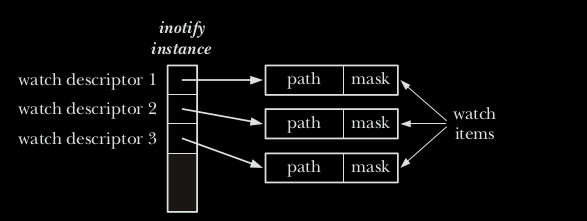
Starting with kernel 2.6.13, Linux provides the inotify mechanism, which allows an application to monitor file events.
The inotify_init() system call creates a new inotify instance.
Inotify can be used to monitor individual files, or to monitor di‐ rectories. When a directory is monitored, inotify will return events for the directory itself, and for files inside the directory.
#include <sys/inotify.h>
int inotify_init(void);
//Returns file descriptor on success, or –1 on error
inotify_init(): creates an inotify instance and returns a file descriptor referring to the inotify instance. inotify_add_watch(): manipulates the "watch list" associated with an inotify instance. Each item ("watch") in the watch list specifies the pathname of a file or directory, along with some set of events that the kernel should monitor for the file referred to by that path name. inotify_add_watch(2) either creates a new watch item, or modifies an existing watch. Each watch has a unique "watch descriptor",an integer returned by inotify_add_watch(2) when the watch is created.
#include <sys/inotify.h>
int inotify_add_watch(int fd , const char * pathname , uint32_t mask );
//Returns watch descriptor on success, or –1 on error
inotify_remove_watch(): removes an item from an inotify watch list.
#include <sys/inotify.h>
int inotify_rm_watch(int fd , uint32_t wd );
//Returns 0 on success, or –1 on error
| Bit Value | Descrpition |
|---|---|
| IN_ACESS | File was accessed (read()) |
| IN_ATTRIB | File metadata changed |
| IN_CLOSE_WRITE | File opened for writing was closed |
| IN_CLOSE_NOWRITE | File opened read-only was closed |
| IN_CREATE | File /directory created inside watched directory |
| IN_DELETE | File /directory deleted from within watched directory |
| IN_DELETE_SELF | Watched file /directory was itself deleted |
| IN_MODIFY | File was modified |
| IN_MOVE_TO | File moved into watched directory |
| IN_OPEN | File was opened |
| IN_ALL_EVENTS | Shorthand for all of the above input events |
| IN_MOVE | Shorthand for IN_MOVED_FROM | IN_MOVED_TO |
| IN_CLOSE | Shorthand for IN_CLOSE_WRITE | IN_CLOSE_NOWRITE |
| IN_DONT_FOLLOW | Dont dereference symbolic link(since Linux 2.6.15) |
| IN_MASK_ADD | Add event to current watch mask for pathname |
| IN_ONESHOT | Monitor pathname for just one event |
| IN_ONLYDIR | Fail if pathname is not a directory (Since Linux 2.6.15) |
| IN_IGNORED | Watch was removed by the application or by kernel |
| IN_ISDIR | Filename returned in name directory |
| IN_Q_OVERFLOW | Overfow on event queue |
| IN_UMOUNT | File system containing object was unmounted |
Example:We create a simple c program to monitor events like IN_CREATE, IN_DELETE, IN_MODIFY( create, delete and modify) if any in /temp/testdir
#include<stdio.h>
#include<stdlib.h>
#include<error.h>
#include<sys/types.h>
#include<unistd.h>
#include<sys/inotify.h>

#define EVENT_SIZE (sizeof (struct inotify_event))
#define BUF_LEN ( 1024 * (EVENT_SIZE +16))
int main(){
    for(;;){
    int length, i = 0;
    int fd, wd;

    char buffer[BUF_LEN];
    fd = inotify_init();
    if(fd < 0)
    perror("inotify_init");
    wd = inotify_add_watch(fd, "/temp/testdir",IN_MODIFY | IN_CREATE | IN_DELETE);
    length = read(fd, buffer, BUF_LEN);
    if(length < 0)
    perror("read");
    while (i < length)
    {
        struct inotify_event * event = (struct inotify_event *) &buffer[i];
        if(event -> mask & IN_CREATE)
            printf("The file %s is created.\n",event-> name);
        if(event -> mask & IN_DELETE)
            printf("The file %s is deleted.\n",event-> name);
        if(event -> mask & IN_MODIFY)
            printf("The file %s is modified.\n",event-> name);
        i+=EVENT_SIZE + event->len;
    }
    (void) inotify_rm_watch(fd,wd);
    (void) close(fd);

    }
}
Some related questions in signals:
A signal is a notification to a process that an event has occurred. Signals are some times described as software interrupts. Signals are analogous to hardware interrupts in that they interrupt the normal flow of execution of a program; in most cases, it is not possible to predict exactly when a signal will arrive.
One process sends signal to another process as a primitive form of interprocess communication (IPC) or within a same process.But mostly the signal is send by kernel or system call.
The Linux-specific /proc/ PID /status file contains various bit-mask fields that can be inspected to determine a process’s treatment of signals. The bit masks are displayed as hexadecimal numbers, with the least significant bit representing signal 1, the next bit to the left representing signal 2, and so on. These fields are SigPnd (per-thread pending signals), ShdPnd (process-wide pending signals; since Linux 2.6), SigBlk (blocked signals), SigIgn (ignored signals), and SigCgt (caught signals). The same information can also be obtained using various options to the ps(1) command.
Linux signals:
| Name | Signal Number | Description | Default |
|---|---|---|---|
| SIGABRT | 6 | Abort process | core |
| SIGA LRM | I4 | Real-time timer expired | tenn |
| SIGBUS | 7 (SAlvlP=IO) | memory access error | core |
| SIGCHLD | I 7 (SA=20, lv1P=I8) | Child terminated or stopped | ignore |
| SIGCONT | I 8 (SA=I 9, lv1=25, P=26) | Continue if stopped | cont |
| SIGEMT | u ndef (SAlvlP=7) | Hardware fault | tenn |
| SIGFPE | 8 | Arithmetic exception | core |
| SIGHUP | I | Hangup | tenn |
| SIGILL | 4 | lllegal instruction | core |
| SIGINT | 2 | Terminal interrupt | tenn |
| SIGIO I | 29 (SA=23, lvlP=22) | 1/0 possible | tenn |
| SIGPOLL | |||
| SIGKILL | 9 | Sure kill | tenn |
| SIGPIPE | I 3 | Broken pipe | tenn |
| SIGPROF | 27 (M=29, P=2I) | Profiling ti1ner expired | tenn |
| SIGPWR | 30 (SA=29, MP=I 9) | Power abou t to fail | tenn |
| SIGQUIT | 3 | Terminal quit | core |
| SIGSEGV | I I | Invalid Memory reference | core |
| SIGSTKFLT | I 6 (SAM=u ndef, P=36) | Stack fault on coprocessor | tenn |
| SIGSTOP | I 9 (SA=I 7, lv1=23, P=24) | Sure stop | stop |
| SIGSYS | 3I (SAlvlP= I 2) | Invalid syste1n call | core |
| SIGTERM | I 5 | Terminate process | tenn |
| SIGTRAP | 5 | Trace/breakpoint trap | core |
| SIGTSTP | 20 (SA=I S, M=24, P=25) | Terminal stop | stop |
| SIGTTIN | 2I (lv1=26, P=27) | Terminal read fro1n BG | stop |
| SIGTTOU | 22 (lv1=27, P=28) | Terminal write fro1n BG | stop |
| SIGURG | 23 (SA=I 6, lv1=2I, P=29) | Urgent data on socket | ignore |
| SIGUSR1 | I O (SA=30, MP=I 6) | User-defined signal I | tenn |
| SIGUSR2 | I 2 (SA=3I , lv1P=I7) | User-defined signal 2 | tenn |
| SIGVTALRM | 26 (M=28, P=20) | Vi1tual ti1ner expired | tenn |
| SIGHINCH | 28 (M=20, P=23) | Terminal window size change | ignore |
| SIGXCPU | 24 (M=30, P=33) | CPUtime limit exceeded | core |
| SIGXFSZ | 25 (lv1=3I , P=34) | File size limit exceeded | core |
The signal() system call, which is described in this section, was the original API for setting the disposition of a signal, and it provides a simpler interface
#include <signal.h>
void ( *signal(int sig , void (* handler )(int)) ) (int);
//Returns previous signal disposition on success, or SIG_ERR on error
void
handler(int sig)
{
/* Code for the handler */
}
Although documented in section 2 of the Linux manual pages, signal() is actually implemented in glibc as a library function layered on top of the sigaction() system call.
A signal handler (also called a signal catcher) is a function that is called when a specified signal is delivered to a process.
Invocation of a signal handler may interrupt the main program flow at any time; the kernel calls the handler on the process’s behalf, and when the handler returns, execution of the program resumes at the point where the handler interrupted it. This sequence is illustrated in below figure:

Example to catch SIGINT signal:
#include<stdio.h>
#include<stdlib.h>
#include<unistd.h>
#include<signal.h>

void signalhandler(int);
int main(){
    signal(SIGINT,signalhandler);
    for(;;){
        printf("Sleeping...");
        sleep(3);
    }
}

void signalhandler(int sig_num){
    printf("Got the signal %d\n",sig_num);
    exit(1);
}
One process can send a signal to another process using the kill() system call, which is the analog of the kill shell command.
#include <signal.h>
int kill(pid_t pid , int sig );
//Returns 0 on success, or –1 on error
Which is analogous to shell command:
sudo kill -9 PID
A timer allows a process to schedule a notification for itself to occur at some time in the future. Sleeping allows a process (or thread) to suspend execution for a period of time.
The classical UNIX APIs for setting interval timers (setitimer() and alarm()) to notify a process when a certain amount of time has passed.
The setitimer system call is a generalization of the alarm call. It schedules the delivery of a signal at some point in the future after a fixed amount of time has elapsed.
A program can set three different types of timers with setitimer:
If the timer code is ITIMER_REAL, the process is sent a SIGALRM signal after the specified wall-clock time has elapsed.
If the timer code is ITIMER_VIRTUAL, the process is sent a SIGVTALRM signal after the process has executed for the specified time. Time in which the process is not executing (that is, when the kernel or another process is running) is not counted.
If the timer code is ITIMER_PROF, the process is sent a SIGPROF signal when the specified time has elapsed either during the process's own execution or the execution of a system call on behalf of the process.
#include <sys/time.h>
int getitimer(int which, struct itimerval *curr_value);
int setitimer(int which, const struct itimerval *new_value, struct itimerval *old_value);
The first argument to setitimer is the timer code, specifying which timer to set. The second argument is a pointer to a struct itimerval object specifying the new settings for that timer. The third argument, if not null, is a pointer to another struct itimerval object that receives the old timer settings.
Here's an example from here which uses setitimer() to periodically call dostuff().
The key here is that calling setitimer() results in the OS scheduling a SIGALRM to be sent to your process after the specified time has elapsed, and it is up to your program to handle that signal when it comes. You handle the signal by registering a signal handler function for the signal type (dostuff() in this case) after which the OS will know to call that function when the timer expires.
#include<stdio.h>
#include<stdlib.h>
#include<unistd.h>
#include<sys/time.h>
#include<signal.h>

#define INTERVAL 50

void status(int);
int main(){
	struct itimerval it_val;
	if(signal(SIGALRM,(void(*)(int))status)==SIG_ERR){
	perror("Unable to catch the alarm signal\n");
	exit(1);
	}

	it_val.it_value.tv_sec = INTERVAL/1000; //to convert milisec into sec
	it_val.it_value.tv_usec = (INTERVAL*1000) % 1000000;

	it_val.it_interval = it_val.it_value;
	if(setitimer(ITIMER_REAL, & it_val,NULL)== -1){
		perror("setitimer error");
		exit(1);
	}

	for(;;){
	pause();
	}
}

void status(int signum)
{
	printf("Timer went off here!!\n");
}
Creates a child process.
#include <sys/types.h>
#include <unistd.h>
pid_t fork(void);
/*In parent: returns process ID of child on success, or –1 on error; in successfully created child: always returns 0 */
*pid_t *data type in C
pid_t data type stands for process identification and it is used to represent process ids. Whenever, we want to declare a variable that is going to be deal with the process ids we can use pid_t data type.
The type of pid_t data is a signed integer type (signed int or we can say int). fork() creates a new process by duplicating the calling process. The new process is referred to as the child process. The calling process is referred to as the parent process.
The child process and the parent process run in separate memory spaces. At the time of fork() both memory spaces have the same content.Memory writes, file mappings (mmap(2)), and unmappings (munmap(2)) performed by one of the processes do not affect the other.
The child process is an exact duplicate of the parent process except for the following points:
The child has its own unique process ID, and this PID does not match the ID of any existing process group (setpgid(2)) or session.
The child's parent process ID is the same as the parent's process ID.
The child does not inherit its parent's memory locks (mlock(2), mlockall(2)).
Process resource utilizations (getrusage(2)) and CPU time counters (times(2)) are reset to zero in the child.
The child's set of pending signals is initially empty (sigpending(2)).
The child does not inherit semaphore adjustments from its parent (semop(2)).
The child does not inherit process-associated record locks from its parent (fcntl(2)). (On the other hand, it does inherit fcntl(2) open file description locks and flock(2) locks from its parent.)
The child does not inherit timers from its parent (setitimer(2), alarm(2), timer_create(2)).
The child does not inherit outstanding asynchronous I/O operations from its parent (aio_read(3), aio_write(3)), nor does it inherit any asynchronous I/O contexts from its parent (see io_setup(2)).
Note the following further points:
The child process is created with a single thread—the one that called fork(). The entire virtual address space of the parent is repli‐ cated in the child, including the states of mutexes, condition variables, and other pthreads objects; the use of pthread_atfork(3) may be helpful for dealing with problems that this can cause.
After a fork() in a multithreaded program, the child can safely call only async-signal-safe functions (see signal-safety(7)) until such time as it calls execve(2).
The child inherits copies of the parent's set of open file descriptors. Each file descriptor in the child refers to the same open file description (see open(2)) as the corresponding file descriptor in the parent. This means that the two file descriptors share open file status flags, file offset, and signal-driven I/O attributes (see the description of F_SETOWN and F_SETSIG in fcntl(2)).
The child inherits copies of the parent's set of open message queue descriptors (see mq_overview(7)). Each file descriptor in the child refers to the same open message queue description as the corresponding file descriptor in the parent. This means that the two file de‐ scriptors share the same flags (mq_flags).
The child inherits copies of the parent's set of open directory streams (see opendir(3)). POSIX.1 says that the corresponding directory streams in the parent and child may share the directory stream positioning; on Linux/glibc they do not.
NOTE:If the fork value is:
- Negative:Creation of child unsuccessful
- Zero:Returned to newly created child process
- Positive:Return to parent or caller.
fork() creates copy of parent's data,text,heap and stack segments. This may result in wasteful of memory and processor in such a way that fork() is often followed by an immediate exec(), which replaces the process's text with an ew program and reinitialize the process's data,heap,stack. Implementation to solve this memory issue:
//process creation and Termination;
//fork()--> duplicate the original as copy to child
//;exit()-->for parent ;
//_exit() --> for child
#include<unistd.h>
#include<stdio.h>
#include<stdlib.h>
#include<sys/types.h>
int main(){
    fork(); //clone the main function
    printf("Fork program!!\n");
    printf("Child process killed\n");
    _exit(1);
}
Example to show forking from parent to child:
#include <stdio.h>
#include <sys/types.h>
#include <unistd.h>
void forkexample()
{
    // child process because return value zero
    if (fork() == 0)
        printf("Hello from Child!\n");

    // parent process because return value non-zero.
    else
        printf("Hello from Parent!\n");
}
int main()
{
    forkexample();
    return 0;
}
For termination of process we use:
#include <stdlib.h>
void _exit(int status );
//Return 0 on success and nonzero on failure
The status argument given to _exit() defines the termination status of the process, which is available to the parent of this process when it calls wait(). Although defined as an int, only the bottom 8 bits of status are actually made available to the parent.
A process is always successfully terminated by _exit() (i.e., _exit() never returns).
NOTE: Although any value in the range 0 to 255 can be passed to the parent via the status argument to _exit(), specifying values greater than 128 can cause confusion in shell scripts. The reason is that, when a command is terminated by a signal, the shell indicates this fact by setting the value of the variable $? to 128 plus the signal number, and this value is indistinguishable from that yielded when a process calls _exit() with the same status value.
#include <stdlib.h>
void exit(int status );
//Return 0 on success and nonzero on failure;
Unlike _exit(), which is UNIX-specific, exit() is defined as part of the standard C library; that is, it is available with every C implementation.
Instead of calling exit(), the child can call _exit(), so that it doesn’t flush stdio buffers. This technique exemplifies a more general principle: in an application that creates child processes, typically only one of the processes (most often the parent) should terminate via exit(), while the other processes should terminate via _exit(). This ensures that only one process calls exit handlers and flushes stdio buffers, which is usually desirable.
In many applications where a parent creates child processes, it is useful for the parent to be able to monitor the children to find out when and how they terminate. This facility is provided by wait() and a number of related system calls.
The wait() system call waits for one of the children of the calling process to terminate and returns the termination status of that child in the buffer pointed to by status.
#include <sys/types.h>
#include <sys/wait.h>

pid_t wait(int *wstatus);
//Returns process ID of terminated child, or –1 on error
If a child has already changed state, then these calls return immediately. Otherwise, they block until either a child changes state or a signal handler interrupts the call (assuming that system calls are not automatically restarted using the SA_RESTART flag of sigaction(2)). In the remainder of this page, a child whose state has changed and which has not yet been waited upon by one of these system calls is termed waitable.
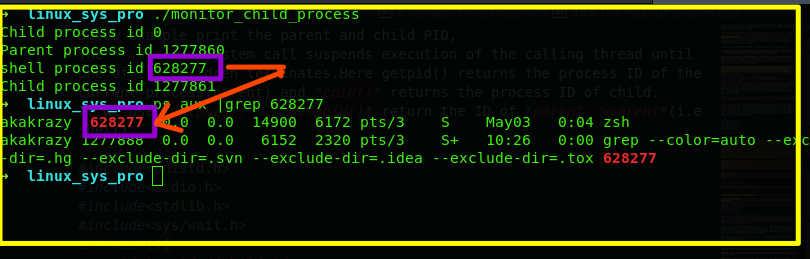
Below example print the parent and child PID, The wait() system call suspends execution of the calling thread until one of its children terminates.Here getpid() returns the process ID of the current process(parent) and cpid() returns the process ID of child. If we use getppid() , getppid() return the ID of parent-->parent(i.e shell)
#include<unistd.h>
#include<stdio.h>
#include<stdlib.h>
#include<sys/wait.h>
int main(){
    pid_t cpid;//child id
    if(fork()==0){
    printf("Child process id %d\n",cpid);
    exit(0);//without error
    }
    else
    cpid =wait(NULL);
    printf("Parent process id %d\n",getpid());
    printf("Child process id %d\n",cpid);
    //printf("Shell pid is %d\n",getppid());


   return 0;
}
ps aux |grep 628277
Figure of ps aux source screenshot child process.
The execve() system call loads a new program into a process’s memory. During this operation, the old program is discarded, and the process’s stack, data, and heap are replaced by those of the new program.
#include <unistd.h>

int execve(const char *pathname, char *const argv[],char *const envp[]);
//Never Returns on successn returns -1 on error
execve() executes the program referred to by pathname. This causes the program that is currently being run by the calling process to be
replaced with a new program, with newly initialized stack, heap, and (initialized and uninitialized) data segments.
This pathname can be absolute (indicated by an initial / )
or relative to the current working directory of the calling process.
The argv argument specifies the command-line arguments to be passed to the new program. This array corresponds to, and has the same form as, the secon (argv) argument to a C main() function; it is a NULL -terminated list of pointers to character strings. The value supplied for argv[0] corresponds to the command name. Typically, this value is the same as the basename (i.e., the final component) of pathname.
The final argument, envp, specifies the environment list for the new program. The envp argument corresponds to the environ array of the new program; it is a NULL - terminated list of pointers to character strings of the form name=value
The Linux-specific /proc/ PID /exe file is a symbolic link containing the absolute pathname of the executable file being run by the corresponding process.
After an execve(), the process ID of the process remains the same, because the same process continues to exist.A few other process attribute also remain unchanged.
If the set-user-ID (set-group-ID) permission bit of the program file specified by pathname is set, then, when the file is execed, the effective user (group) ID of the process is changed to be the same as the owner (group) of the program file. This is a mechanism for temporarily granting privileges to users while running a specific program.(plays important role in priviledge escilation)
After optionally changing the effective IDs, and regardless of whether they were changed, an execve() copies the value of the process’s effective user ID into its saved set-user-ID, and copies the value of the process’s effective group ID into its saved set-group-ID
Example:
#include<stdlib.h>
#include<unistd.h>
int main(){
	execve("/bin/sh",0,0);
	return 0;
}
This causes the program(i.e main()) that is currently being run by the calling process to be replaced with a new program(i.e '/bin/sh'), with newly initialized stack, heap, and (initialized and uninitialized) data segments. Here the PID of our main program is same as PID of the '/bin/sh'.
#include<stdlib.h>
#include<unistd.h>
#include<stdio.h>
int main(){
	printf("PID is %d\n",getpid());
	execve("/bin/sh",0,0);

	//getchar();
	return 0;
}
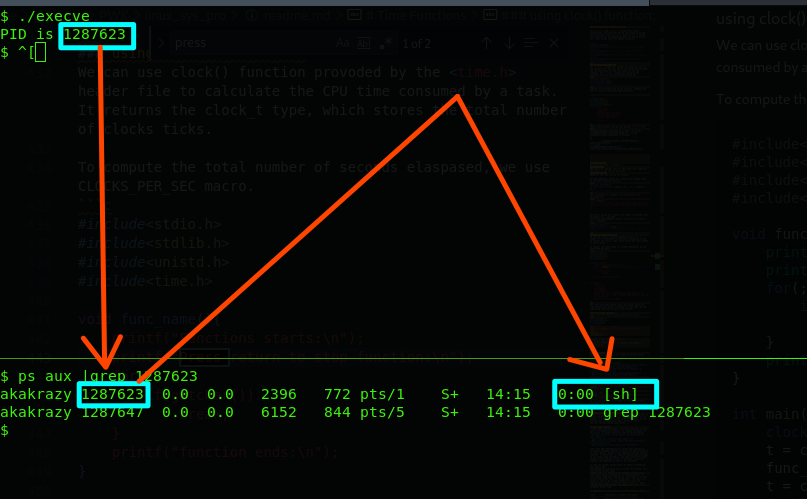 screenshot of execve running PID ...
I have explain more about execve along with its assembly language instruction in https://github.com/manoj983/execve. And also comparing execve,glibc execve,and assembly execve.
#include <unistd.h>
int execle(const char * pathname , const char * arg , ...
/* , (char *) NULL, char *const envp [] */ );
int execlp(const char * filename , const char * arg , ...
/* , (char *) NULL */);
int execvp(const char * filename , char *const argv []);
int execv(const char * pathname , char *const argv []);
int execl(const char * pathname , const char * arg , ...
/* , (char *) NULL */);
//None of the above returns on success; all return –1 on error
The exec() family of functions replaces the current process image with a new process image. The functions described in this manual pageare front-ends for execve(2). (As I already describe about execve() about the replacement of the current process image.)
The initial argument for these functions is the name of a file that is to be executed.
The functions can be grouped based on the letters following the "exec" prefix.
All of these functions are layered on top of execve(), and they differ from one another and from execve() only in the way in which the program name, argument list, and environment of the new program are specified.
Summary of Difference betn exec() functions.
| Function | Specification of Program file (-,p) | Specification of arguments (v.l) | Source of environment (e,-) |
|---|---|---|---|
| execue() | path na1ne | array | envp argLunent |
| execle() | path na1ne | list | envp argLunent |
| execlp() | filena1ne + PATH | list | caller's environ |
| execvp() | filena1ne + PATH | array | caller's environ |
| execu() | path na1ne | array | caller's environ |
| exeel() | path na1ne | list | caller's environ |
Like processes, threads are a mechanism that permits an application to perform multiple tasks concurrently. A single process can contain multiple threads, as illustrated in Figure 29-1. All of these threads are independently executing the same program, and they all share the same global memory, including the initialized data, uninitialized data, and heap segments. (A traditional UNIX process is simply a special case of a multithreaded processes; it is a process that contains just one thread.)
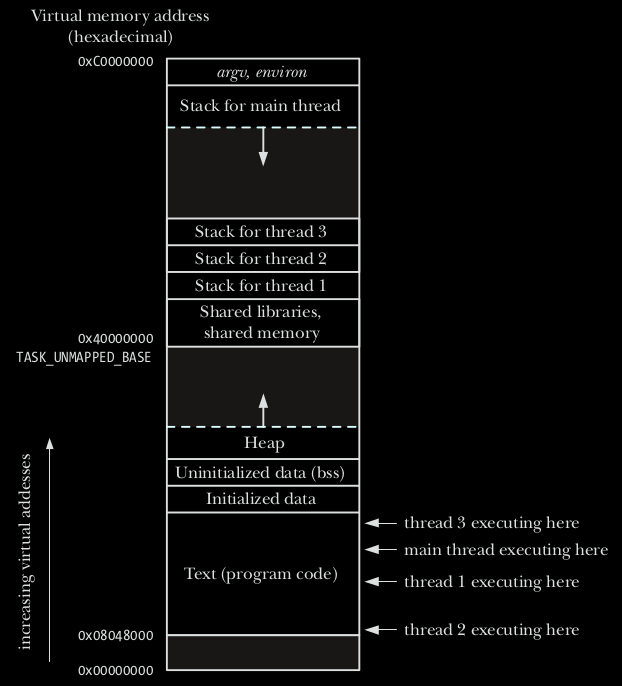 screenshot of 3 threads on one process ...
In traditional UNIX implementation we use fork() to create multiple processes for parallel processing.Consider a scenario where a server need to handle multiple client communication,here fork() is used to create child process for each communication to new client.This approach quite good but have some limitations:
List of the attributes shared among threads are:
POSIX.1 specifies a set of interfaces (functions, header files) for threaded programming commonly known as POSIX threads, or Pthreads. A single process can contain multiple threads, all of which are executing the same program. These threads share the same global memory (data and heap segments), but each thread has its own stack (automatic variables).
Linux implementations of POSIX threads Over time, two threading implementations have been provided by the GNU C library on Linux:
Pthreads data types:
| Data Types | Description |
|---|---|
| pthread_t | Thread identifier |
| pthread_mutex_l | Mutex |
| pthread_mutexattr_l | Mutex attributes object |
| pthread_cond_l | Condition variable |
| pthread_condattr_l | Conditional variable attributes object |
| pthread_once_t | One-time initialization control context |
| pthread_attr_t | Thread attributes object |
pthread_t -->mostly structure
LinuxThreads: This is the original Pthreads implementation. Since glibc 2.4, this implementation is no longer supported.
NPTL (Native POSIX Threads Library) This is the modern Pthreads implementation. By comparison with LinuxThreads, NPTL provides closer conformance to the requirements of the POSIX.1 specification and better performance when creating large numbers of threads. NPTL is available since glibc 2.3.2, and requires features that are present in the Linux 2.6 kernel.
Both of these are so-called 1:1 implementations, meaning that each thread maps to a kernel scheduling entity. Both threading implementations employ the Linux clone(2) system call. In NPTL, thread synchronization primitives (mutexes, thread joining, and so on) are implemented using the Linux futex(2) system call.
When a program is started, the resulting process consists of a single thread, called the initial or main thread. In this section, we look at how to create additional threads using pthread_create().
The pthread_create() function creates a new thread.
#include <pthread.h>
int pthread_create(pthread_t * thread , const pthread_attr_t * attr ,void *(* start )(void *), void * arg );
//Returns 0 on success, or a positive error number on error
pthread_self()
The pthread_self() function returns the ID of the calling thread. This is the same value that is returned in *thread in the pthread_create(3) call that created this thread.
include <pthread.h>
pthread_t pthread_self(void);
//Returns the thread ID of the calling thread
pthread_equal()
The pthread_equal() function compares two thread identifiers.Compare thread IDs.
include <pthread.h>
int pthread_equal(pthread_t t1 , pthread_t t2 );
//Returns nonzero value if t1 and t2 are equal, otherwise 0
pthread_join()
The pthread_join() function for threads is the equivalent of wait() for processes. A call to pthread_join blocks the calling thread until the thread with identifier equal to the first argument terminates.
 #include <pthread.h>
    int pthread_join(pthread_t thread, void **retval);
pthread_cancel()
Used to send a cancellation request to a thread.
 #include <pthread.h>
    int pthread_cancel(pthread_t thread);
pthread_detach()
Used to detach a thread. A detached thread does not require a thread to join on terminating. The resources of the thread are automatically released after terminating if the thread is detached
#include<pthread.h>
    int pthread_detach(pthread_t thread);
Example:Below is example where we used thread_id to create thread identifier and thread_create() to create the thread(only on in this example). ThreadFunction() is a simple function just to print and consume time as something is happening.
/* Process and threads!!
All Pthreads functions return 0 on success or a positive value on failure. The failure value is one of
the same values that can be placed in errno by traditional UNIX system calls.
gcc linux_pr.c -lpthread
*/
#include<stdlib.h>
#include<unistd.h>
#include<stdio.h>
#include<pthread.h>

void *ThreadFunction(void *vargc)
{
    sleep(2);
    printf("Thread start from here!!!\n");
    return NULL;
}

int main(){
    pthread_t thread_id;

    printf("Before the thread calling!!!\n");
    pthread_create(&thread_id,NULL,ThreadFunction,NULL);
//printf("%d",thread_id);
    pthread_join(thread_id,NULL);
//printf("%d",thread_id);
    getchar();
    printf("After thread calling!!\n");


    exit(0);
}
Example2:Here we used pthread_create() function to create two threads.Inside the function doSomeThing(), pthread_self() and pthread_equal() is used to print respective thread ID and compare either the thread is first or second one respectively.And we use for loop just to consume time to illustrate somethinfg is happening :).
#include<stdio.h>
#include<string.h>
#include<pthread.h>
#include<stdlib.h>
#include<unistd.h>

pthread_t tid[2];

void* doSomeThing(void *arg)
{
    unsigned long i = 0;
    pthread_t id = pthread_self();

    if(pthread_equal(id,tid[0]))
    {
        printf("\n First thread processing\n");
    }
    else
    {
        printf("\n Second thread processing\n");
    }

    for(i=0; i<(0xFFFFFFFF);i++); //loop just to consume some time.

    return NULL;
}

int main(void)
{
    int i = 0;
    int err;

    while(i < 2)
    {
        err = pthread_create(&(tid[i]), NULL, &doSomeThing, NULL);
        if (err != 0)
            printf("\ncan't create thread :[%s]", strerror(err));
        else
            printf("\n Thread created successfully\n");

        i++;
    }

    sleep(5);
    return 0;
}
Output:
$ ./thread_programming1

 Thread created successfully

 First thread processing

 Thread created successfully

 Second thread processing
As seen in the output, first thread is created and it starts processing, then the second thread is created and then it starts processing. Well one point to be noted here is that the order of execution of threads is not always fixed. It depends on the OS scheduling algorithm.
Note: The whole explanation in this topic is done on Posix threads. As can be comprehended from the type, the pthread_t type stands for POSIX threads. If an application wants to test whether POSIX threads are supported or not, then the application can use the macro _POSIX_THREADS for compile time test. To compile a code containing calls to posix APIs, please use the compile option ‘-pthread’.
Thread synchronization is defined as a mechanism which ensures that two or more concurrent processes or threads do not simultaneously execute some particular program segment known as a critical section. Processes’ access to critical section is controlled by using synchronization techniques. When one thread starts executing the Critical Section (a serialized segment of the program) the other thread should wait until the first thread finishes. If proper synchronization techniques are not applied, it may cause a Race Condition where the values of variables may be unpredictable and vary depending on the timings of context switches of the processes or threads.
In this topic we will discuss about two tools that threads can use to synchronize their actions: mutex and conditional variables.
Mutexes allow threads to synchronize their use of a shared resource, so that, for example, one thread doesn’t try to access
a shared variable at the same time as another thread is modifying it.
Below is an example to illustrate thread synchronization problem in c. called Race Condition \
/* Process and threads!!
All Pthreads functions return 0 on success or a positive value on failure. The failure value is one of
the same values that can be placed in errno by traditional UNIX system calls.
gcc linux_pr.c -lpthread
*/
#include<stdlib.h>
#include<unistd.h>
#include<stdio.h>
#include<pthread.h>
int shared = 5;
void *ThreadFunction1()
{
    //sleep(2);
    int x;
    x = shared;
    x++;
    sleep(3);
    shared = x;
    printf("value of shared from func1 is %d\n",shared);
    //return shared;

}
void * ThreadFunction2(){
	//sleep(2);

	int y;
	y=shared;
	y--;
	sleep(3);
	shared =y;
	printf("value of shared from func2 is %d\n",shared);
	//return shared;

}

int main(){
    pthread_t thread_id1,thread_id2;

    printf("Before the thread calling!!!\n");

    pthread_create(&thread_id1,NULL,ThreadFunction1,NULL);
    pthread_create(&thread_id2,NULL,ThreadFunction2,NULL);
//printf("%d",thread_id);
    pthread_join(thread_id1,NULL);
    pthread_join(thread_id2,NULL);

//printf("%d",thread_id);
//    getchar();
    printf("After thread calling!!\n");
  printf("Final value of shared is %d\n",shared);


    exit(0);
}
Expected Output of Final Shared Variable is 5.
But Output is:
Before the thread calling!!!
value of shared from func1 is 6
value of shared from func2 is 4
After thread calling!!
Final value of shared is 4
Problem?? (for solution refer solution thread synchronization) *
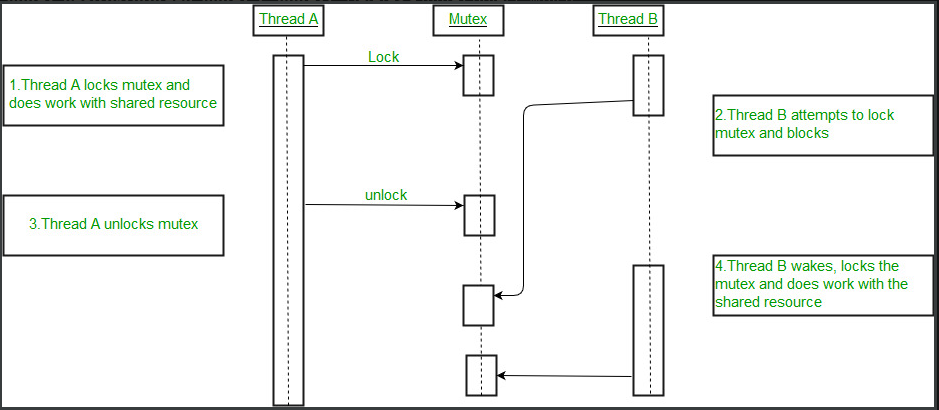
After initialization, a mutex is unlocked. To lock and unlock a mutex, we use the pthread_mutex_lock() and *pthread_mutex_unlock() functions.
#include <pthread.h>
int pthread_mutex_lock(pthread_mutex_t * mutex );
int pthread_mutex_unlock(pthread_mutex_t * mutex );
//Both return 0 on success, or a positive error number on error
int pthread_mutex_destroy(pthread_mutex_t *mutex)
//Return 0 on success and -1 on failure
To lock a mutex, we specify the mutex in a call to pthread_mutex_lock(). If the mutex is currently unlocked, this call locks the mutex and returns immediately. If the mutex is currently locked by another thread, then pthread_mutex_lock() blocks until the mutex is unlocked, at which point it locks the mutex and returns.
using mutex.
/* Process and threads!!
All Pthreads functions return 0 on success or a positive value on failure. The failure value is one of
the same values that can be placed in errno by traditional UNIX system calls.
gcc linux_pr.c -lpthread
*/
#include<stdlib.h>
#include<unistd.h>
#include<stdio.h>
#include<pthread.h>
int shared = 5;
pthread_mutex_t lock;
void *ThreadFunction1()
{
    //sleep(2);
    pthread_mutex_lock(&lock);
    int x;
    x =shared;
    x = x+1;
    sleep(3);
    shared = x;
    printf("value of shared from func1 is %d\n",shared);
    //return shared;
    pthread_mutex_unlock(&lock);
}
void * ThreadFunction2(){
	//sleep(2);
	pthread_mutex_lock(&lock);
	int y;
	y=shared;
	y = y-1;
	sleep(3);
	shared =y;
	printf("value of shared from func2 is %d\n",shared);
	//return shared;
	pthread_mutex_unlock(&lock);
}

int main(){
    pthread_t thread_id1,thread_id2;

    printf("Before the thread calling!!!\n");
    pthread_mutex_init(&lock,NULL);
    pthread_create(&thread_id1,NULL,ThreadFunction1,NULL);
    pthread_create(&thread_id2,NULL,ThreadFunction2,NULL);
//printf("%d",thread_id);
    pthread_join(thread_id1,NULL);
    pthread_join(thread_id2,NULL);
    pthread_mutex_destroy(&lock);
//printf("%d",thread_id);
//    getchar();
    printf("After thread calling!!\n");
  printf("Final value of shared is %d\n",shared);


    exit(0);
}
Output:
Before the thread calling!!!
value of shared from func2 is 4
value of shared from func1 is 5
After thread calling!!
Final value of shared is 5
When more than one processes access a same code segment that segment is known as critical section. Critical section contains shared variables or resources which are needed to be synchronized to maintain consistency of data variable. In simple terms a critical section is group of instructions/statements or region of code that need to be executed atomically such as accessing a resource (file, input or output port, global data, etc.).
In concurrent programming, if one thread tries to change the value of shared data at the same time as another thread tries to read the value (i.e. data race across threads), the result is unpredictable.
The access to such shared variable (shared memory, shared files, shared port, etc…) to be synchronized. Few programming languages have built-in support for synchr When thread1 is processing the scheduler take thread2 in processing.
It is critical to understand the importance of race condition while writing kernel mode programming (a device driver, kernel thread, etc.). since the programmer can directly access and modifying kernel data structures.
| Entry section |
|---|
| Critical Setion |
| Exit Section |
| Remainder Section |
A simple solution can be made as:
acquireLock();
ProcessCriticalSection();
ReleaseLock();
Two or more processes executing in a system with an illusion of concurrency and accessing shared data, may try to change the shared data at the same time. Since the process scheduling algorithm can swap between processes at any time, we don't actually know the order in which the processes will access the data leading to inconsistencies in the system.This condition in the system is known as race condition.
For example \
A daemon is a process with the following characteristics:
nohup ./myscript 0<&- &>/dev/null &
will do the job. Or, to capture both stderr and stdout to a file:
nohup ./myscript 0<&- &> my.admin.log.file &
Creating a daemon in Linux uses a specific set of rules in a given order. Knowing how they work will help you understand how daemons operate in userland Linux, but can operate with calls to the kernel also. In fact, a few daemons interface with kernel modules that work with hardware devices, such as external controller boards, printers,and PDAs. They are one of the fundamental building blocks in Linux that give it incredible flexibility and power.
The following steps are required to make a daemon program.
Example of creating a simple daemon in c in linux.
#include<stdlib.h>
#include<unistd.h>
#include<stdio.h>
#include<signal.h>
#include<sys/types.h>
#include<sys/stat.h>
#include<syslog.h>

static void structure_daemon(){
    pid_t pid;
    pid = fork();
    if(pid < 0)
        exit(EXIT_FAILURE);
    if(pid > 0)
        exit(EXIT_SUCCESS);
    if(setsid() < 0)
        exit(EXIT_FAILURE);

    signal(SIGCHLD,SIG_IGN);
    /*The SIG_DFL and SIG_IGN macros expand into integral expressions that are not equal to an address of any function. The macros define signal handling strategies for signal() function.
    Constant 	Explanation
    SIG_DFL 	default signal handling
    SIG_IGN 	signal is ignored
    */
    signal(SIGHUP,SIG_IGN);
    pid = fork();
    if(pid < 0)
        exit(EXIT_FAILURE);
    if(pid > 0)
        exit(EXIT_SUCCESS);
    //umask()
    umask(0);
    //chdir(to root directory)
    chdir("/");
    //close all the fd
    //int i;
    for ( int i = sysconf(_SC_OPEN_MAX); i >=0; i--)
    {
        close(i);
    }
        openlog("Daemon Here",LOG_PID,LOG_DAEMON);

}

int main(){

        structure_daemon();
        for(;;){
            syslog(LOG_NOTICE,"Daemon has started");
            sleep(1);
            break;
        }
        syslog(LOG_NOTICE,"Daemon has terminated");
        closelog();

        return EXIT_SUCCESS;
}
gcc daemons.c -o daemons
./daemons
ps -xj |grep "daemons"+------+-------+------ +--------+-----+-------+------+------+------+-----+
| PPID | PID | PGID | SID | TTY | TPGID | STAT | UID | TIME | CMD |
+------+-------+------ +--------+-----+-------+------+------+------+-----+
|1350 |1518480|1518479|1518479 | ? | -1 | S | 1000 | 0:00 | ./ |
+------+-------+------ +--------+-----+-------+------+------+------+-----+
We printed the message(Daemon has started ) and (Daemon has terminated ) in syslog. We can explore that syslog as:
$ sudo cat /var/log/syslog |tail -2
May 11 21:15:16 kali Daemon Here[1524108]: Daemon has started
May 11 21:15:36 kali Daemon Here[1524108]: Daemon has terminated
NOTE: Insted of syslog() function we can use other function to do the daemon task as per our need (malware)
“For instance, if you are building an application that needs to perform some print operation you don’t have to create a new print function for that, you can simply use existing functions(printf) in libraries(stdio.h) for just printing.” (“ HUMMMM....Understanding Shared Libraries In Linux”)
Shared libraries are a technique for placing library functions into a single unit that can be shared by multiple processes at run time. This technique can save both disk space and RAM.
Linking is actually performed by the separate linker program, ld. When we link a program using the cc (or gcc) command, the compiler invokes ld behind the scenes. On Linux, the linker should always be invoked indirectly via gcc, since gcc ensures that ld is invoked with the correct options and links the program against the correct library files.
Setps in creating a simple c static library and binary.
//File name: lib_mylib.c
#include<stdio.h>
void function(void){
    printf("Hello world\n");
}
//File name:*lib_mylib.h*/
void fun(void);
gcc -c lib_mylib.c -o lib_mylib.o
ar rcs lib_mylib.a lib_mylib.o
Now our library is ready. We need to create a simple program to use our library, so create one.
//File name:program.c
#include "lib_mylib.h"  //this is the  header file
void main(){
    function();
}
gcc -c program.c -o program
gcc -o program program.o -L -l_mylib
./program
Shared libraries usually end with .so (shared object).
Shared libraries are the most common way to manage dependencies on Linux systems. These shared resources are loaded into memory before the application starts, and when several processes require the same library, it will be loaded only once on the system. This feature saves on memory usage by the application.
Another thing to note is that when a bug is fixed in a shared library, every application that references this library will profit from it. This also means that if the bug remains undetected, each referencing application will suffer from it (if the application uses the affected parts).
ldd displays the shared libraries that a program requires to run.
$ ldd ./a.out
        linux-vdso.so.1 (0x00007fff8bb64000)
        libpthread.so.0 => /lib/x86_64-linux-gnu/libpthread.so.0 (0x00007f62079d5000)
        libc.so.6 => /lib/x86_64-linux-gnu/libc.so.6 (0x00007f6207812000)
        /lib64/ld-linux-x86-64.so.2 (0x00007f6207a20000)
library-name => resolves-to-path
We can also use objdump to do so.
objdump -d <<elf_file>>
For malware ue user objdump instead of ldd
objdump -p <<elf>>
Also we can use readelf to do so.
readelf -d <<elf>>
I will cover this topic seperately in reverseing ELF file.
Here in this topic I briefly cover the way of communication between process and threads. The folowing figure explains about the rich variety of UNIX communication and synchronization facilities.
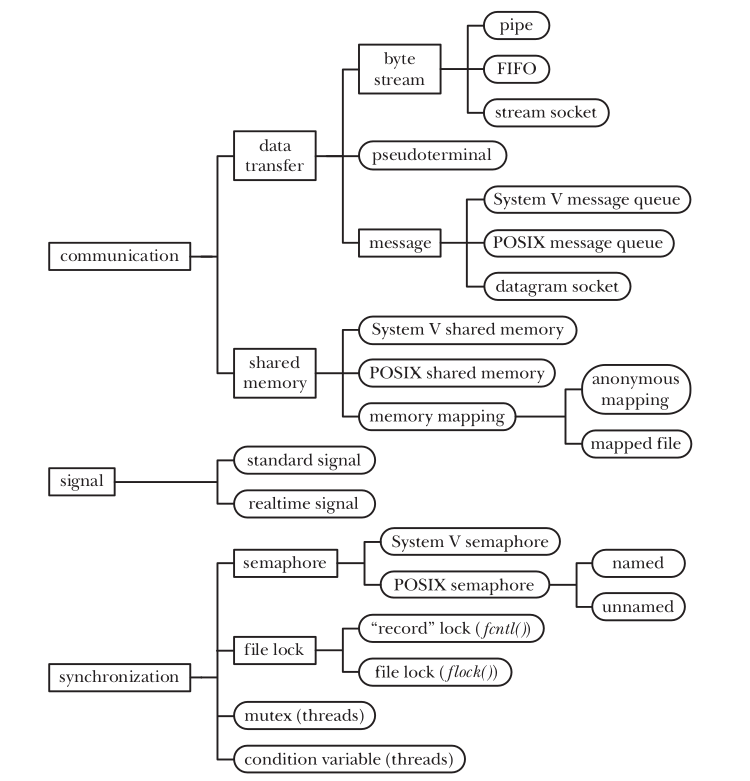
As Figure above figure illustrates, often several facilities provide similar IPC functionality.There are a couple of reasons for this:
stream socket is used to communicate between machine on network while FIFO is used to communicate process on same machine.
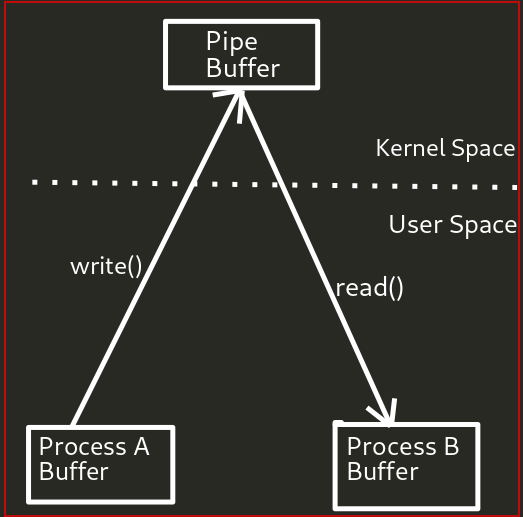
| Facility type | Name used to identify object | Handle used to refer to object in programs | |
|---|---|---|---|
| Pipe FIFO |
no name pathname |
file descriptor file descriptor |
|
| UNIX domain socket Internet domain socket |
pathname IP address + port number |
file descriptor file descriptor | |
| System ' message queue System 'semaphore System 'shared memory |
System V IPC key System V IPC key System V IPC key | System V IPC identifier System V IPC identifier System V IPC identifier | |
| POSIX message queue | POSIX IPC pathname | rnqd_ t (message queue descripto r) | |
| POSIX named semaphore | POSIX IPC pathname | sern_ t '"' (semapho re pointer) | |
| POSIX unnamed semaphore | no name | sern_ t '"' (semapho re pointer) | |
| POSIX shared memo ry | POSIX IPC pathname | file descriptor | |
| Anonymous mapping Memory-mapped file | no name pathname | none file descriptor |
|
| flock() lock Jcntl() lock |
pathname pathname | file descriptor file descriptor |
| Facility type | Accessibility | Persistence | |
|---|---|---|---|
| Pipe FIFO | only by related processes permissions mask | process process | |
| UNIX domain socket Internet domain socket | permissions mask by any process | process process | |
| System V message queue System V semaphore System V shared memory | permissions mask permissions mask permissions mask | kernel kernel kernel | |
| POSIX message queue | permissions mask | kernel | |
| POSIX named semaphore | permissions mask | kernel | |
| POSIX unnamed semaphore | permissions of underlying memory | depends | |
| POSIX shared memory | permissions mask | kernel | |
| Anonymous mapping Memory-mapped file | only by related processes permissions mask | process file system | |
| flo ck () file lock j cntl() file lock |
open() of file open() of file |
process process |
| Interface | Message queues | Semaphores | Shared memory | |
|---|---|---|---|---|
| Header file Associated data structure Create/open object Close obj ect Control operations Perfonning IPC | <sys/msg.h> 1nsqid_ ds 1nsgget() (none) 1nsgctl() 1nsg5nd()-,¥ rite message 1nsgrcv()-read message | <sys/sem.h> sernid_ ds sernget() (none) sernctl() sernop()-tes t/ adjust semaphore | <sys/shm .h> shrnid_ d5 shrnget() + shrnat() shrndl(} shrnctl() access memory in sha red region |
Pipes is the oldest method for IPC in Unix implementation.
Output of one process can be used as the input another process.
ps aux |grep kernel
Pipe is one-way communication only i.e we can use a pipe such that One process write to the pipe, and the other process reads from the pipe. It opens a pipe, which is an area of main memory that is treated as a “virtual file”.
The pipe can be used by the creating process, as well as all its child processes, for reading and writing. One process can write to this “virtual file” or pipe and another related process can read from it.
If a process tries to read before something is written to the pipe, the process is suspended until something is written.
The pipe system call finds the first two available positions in the process’s open file table and allocates them for the read and write ends of the pipe.
Figure:Using a pipe to connect two processes
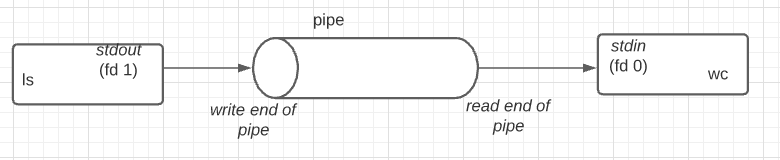
We can use pipes to execute the shell command (read the output or send some input). Here popen() and pclose() functions can be used to demonestrate:
#include <stdio.h>
FILE *popen(const char * command , const char * mode );
//Returns file stream, or NULL on error
int pclose(FILE * stream );
//Returns termination status of child process, or –1 on error
The popen() function opens a process by creating a pipe, forking, and invoking the shell. Since a pipe is by definition unidirectional,the mode argument may specify only reading or writing, not both; the resulting stream is correspondingly read-only or write-only.
The command argument is a pointer to a null-terminated string containing a shell command line. This command is passed to /bin/sh using the -c flag; interpretation, if any, is performed by the shell.
The type argument is a pointer to a null-terminated string which must contain either the letter 'r' for reading or the letter 'w' for writing. Since glibc 2.9, this argument can additionally include the letter 'e', which causes the close-on-exec flag (FD_CLOEXEC) to be set on the underlying file descriptor; see the description of the O_CLOEXEC flag in open(2) for reasons why this may be useful.
The return value from popen() is a normal standard I/O stream in all respects save that it must be closed with pclose() rather than fclose(3). Writing to such a stream writes to the standard input of the command; the command's standard output is the same as that of the process that called popen(), unless this is altered by the command itself. Conversely, reading from the stream reads the command's standard output, and the command's standard input is the same as that of the process that called popen().

Example: Here we uses the popen() . At first popen() create a pipe,the fork a child process that execs a shell, which in turns create a chils process to execute the string given("pwd").
/* Pipes
Inter process communications
Unidirectional  limited capacity bytes stream can be used for the communication between related processes.
*/
#include<stdlib.h>
#include<stdio.h>

int main(){
    char buff[BUFSIZ];
    FILE *fpointer =popen("pwd","r");
    //char lines[255];
    while (fgets(buff,BUFSIZ,fpointer)!=NULL)
    {
        printf("%s",buff);
    }

    //printf("%s",lines);
    pclose(fpointer);
}
//same as reading from a file
FIFO is somehow similar to pipe.The principal difference is that a FIFO has a name within the file system and is opened in the same way as a regular file. This allows a FIFO to be used for communication between unrelated processes (e.g., a client and server).
Usage: mkfifo [OPTION]... NAME...
Create named pipes (FIFOs) with the given NAMEs.
The pathname is the name of the FIFO to be created, and the –m option is used to specify a permission mode in the same way as for the chmod command. Example:
$ mkfifo test1file -m 700 $ ls -al test1file
prwx------ 1 akakrazy akakrazy 0 May 15 11:18 test1file
$ cat test1file
$ echo "This is the test" >test1file
$ cat test1file
This is the test
$
#include <sys/stat.h>
int mkfifo(const char * pathname , mode_t mode );
//Returns 0 on success, or –1 on error
The mode argument specifies the permissions for the new FIFO. These permissions are specified by ORing the desired combination of constants from the table
Opening a FIFO has somewhat unusual semantics. Generally, the only sensible use of a FIFO is to have a reading process and a writing process on each end. Therefore, by default, opening a FIFO for reading (the open() O_RDONLY flag) blocks until another process opens the FIFO for writing (the open() O_WRONLY flag). Conversely, opening the FIFO for writing blocks until another process opens the FIFO for reading. In other words, opening a FIFO synchronizes the reading and writing processes. If the opposite end of a FIFO is already open (perhaps because a pair of processes have already opened each end of the FIFO), then open() succeeds immediately
The argument flags must include one of the following access modes: O_RDONLY, O_WRONLY, or O_RDWR. These request opening the file read-only, write-only, or read/write, respectively.
In addition, zero or more file creation flags and file status flags can be bitwise-or'd in flags. The file creation flags are O_CLOEXEC, O_CREAT, O_DIRECTORY, O_EXCL, O_NOCTTY, O_NOFOLLOW, O_TMPFILE, and O_TRUNC.
Here is the simple example to illustrate the FIFO in linux.Here we passed some string to the process and it passes output to another process as input.
/* FIFO
mkfifo();
Create named pipes (FIFOs) with the given NAMEs.
Writing and reading from same file for process communication.
A FIFO is a special file type that permits independent processes to communicate. One process opens the FIFO file for writing,
and another for reading, after which data can flow as with the usual anonymous pipe in shells or elsewhere.
https://www.gnu.org/software/coreutils/mkfifo
*/
#include<stdlib.h>
#include<stdio.h>
#include<unistd.h>
#include<fcntl.h>
#include<sys/stat.h>
#include<string.h>

int main(){
    char fn[] = "filecreated";
    char out[255] = "This is example of linux FIFO!!\n";
    char in[255];
    int rf,wf;

    if(mkfifo(fn,S_IRWXU)!=0){
        perror("mkfifo error in creating the file!!\n");
    }
    else{
        if((rf=open(fn,O_RDONLY | O_NONBLOCK)) < 0)
        perror("Open error for file!!\n");
        else{
            if(write(wf,out,strlen(out)+1) ==-1 )
            perror("write error!!\n");
            else if (read(rf,in,sizeof(in))== -1)
            perror("read error!!\n");
            else {
                printf("reading '%s' from FIFO \n",out);
            }
                close(wf);
        }
        close(rf);
    }
    unlink(fn);

}
Example: Client server program using the FIFO implementation.
writefirst.c
Here we create a fifo file and give permission 0666.We open the file descriptor in write only mode first and gets inout from the user and write it to a file.
// C program to implement one side of FIFO
// This side writes first, then reads
#include <stdio.h>
#include <string.h>
#include <fcntl.h>
#include <sys/stat.h>
#include <sys/types.h>
#include <unistd.h>

int main()
{
    int fd1,fd2;

    // path to FIFO
    char * myfifo = "/tmp/myfifo";

    // Create the fifo file
    // mkfifo(<pathname>, <permission>)
    mkfifo(myfifo, 0666);

    char write_[80], read_[80];
    while (1)
    {
        // Open FIFO for write only
        fd1 = open(myfifo, O_WRONLY);


        // 80 is maximum length
        fgets(write_, 80, stdin);

        // Write the input write_ing on FIFO
        // and close it
        write(fd1, write_, strlen(write_)+1);
        close(fd1);

        // Open FIFO for Read only
        fd2 = open(myfifo, O_RDONLY);

        // Read from FIFO
        read(fd2, read_, sizeof(read_));

        // Print the read message
        printf("User2: %s\n", read_);
        close(fd2);
    }
    return 0;
}
readfirest.c
Here we create a fifo file and give permission 0666.We open the file descriptor in readonyl mode first, read the content and write it to it.
// C program to implement one side of FIFO
// This side reads first, then reads
#include <stdio.h>
#include <string.h>
#include <fcntl.h>
#include <sys/stat.h>
#include <sys/types.h>
#include <unistd.h>

int main()
{
    int fd1,fd2;

    // path to FIFO
    char * myfifo = "/tmp/myfifo";

    // Create the fifo file
    // mkfifo(pathname,permission bit)
    mkfifo(myfifo, 0666);

    char read_[80], write_[80];
    while (1)
    {
        // First open in read only and read
        fd1 = open(myfifo,O_RDONLY);
        read(fd1, read_, 80);

        // Print the read string and close
        printf("User1: %s\n", read_);
        close(fd1);

        // Now open in write mode and write
        // string taken from user.
        fd2 = open(myfifo,O_WRONLY);
        fgets(write_, 80, stdin);
        write(fd2, write_, strlen(write_)+1);
        close(fd2);
    }
    return 0;
}
Output:
$ ./writefirestfifo
hello from write first
User2: hello from read first
$ ./readfirstfifo
User1: hello from write first

hello from read first
Message queues allows processes to exhange information via messages.All processes can exchange information through access to a common system message queue. The sending process places a message (via some (OS) message-passing module) onto a queue which can be read by another process. Each message is given an identification or type so that processes can select the appropriate message. Process must share a common key in order to gain access to the queue in the first place.
Message queues are quite similar to FIFO and pipes.Here are some differences between them:
get a System V message queue identifier
#include <sys/types.h>
#include <sys/ipc.h>
#include <sys/msg.h>

int msgget(key_t key, int msgflg);
//Return mesage queue identifier on success 0r -1 on failure
key argument is the key value( value of IPC_PRIVATE or a key returned by ftok()).The msgflg is a bit mask that specifies the permission bit. as mentioned in table.
In addition, zero or more of the following flags can be ORed ( | ) in msgflg to control the operation of msgget():
IPC_CREAT: If no message queue with the specified key exists, create a new queue.
IPC_EXCL:If IPC_CREAT was also specified, and a queue with the specified key already exists, fail with the error EEXIST.
For more of these flags refer table
The ftok() function uses the identity of the file named by the given pathname (which must refer to an existing, accessible file) and the least significant 8 bits of proj_id (which must be nonzero) to generate a key_t type System V IPC key, suitable for use with msgget(2), semget(2), or shmget(2)
#include <sys/types.h>
#include <sys/ipc.h>

key_t ftok(const char *pathname, int proj_id);
//On success return value of key_t and on failure its returns -1.
Argument pathname just has to be a file that this process can read. The other argument, proj_id is usually just set to some arbitrary vaue, like 'A' or '66'.
The msgsnd() system call write the message to the messae queue. Send message to the system QUEUE which is read by another process.
#include <sys/types.h>
#include <sys/ipc.h>
#include <sys/msg.h>

int msgsnd(int msqid, const void *msgp, size_t msgsz, int msgflg);
//Returns 0 on suceess and -1 on error
msqid is the return value of the msgget(). The msgp argument is a pointer to a caller-defined structure of the following general form:
struct msgbuf {
long mtype;       /* message type, must be > 0 */
char mtext[1];    /* message data */
};
The msgsz argument specifies the number of bytes contained in the mtext field.
When sending messages with msgsnd(), there is no concept of a partial write as with write(). This is why a successful msgsnd() needs only to return 0, rather than the number of bytes sent.
The final argument, msgflg, is a bit mask of flags controlling the operation of msgsnd().
IPC_NOWAIT:Return immediately if no message of the requested type is in the queue. The system call fails with errno set to ENOMSG.
MSG_COPY:This flag must be specified in conjunction with IPC_NOWAIT, with the result that, if there is no message available at the given position, the call fails immediately with the error ENOMSG. Because they alter the meaning of msgtyp in orthogonal ways, MSG_COPY and MSG_EXCEPT may not both be specified in msgflg.
MSG_COPY:The MSG_COPY flag was added for the implementation of the kernel checkpoint-restore facility and is available only if the kernel was built with the CONFIG_CHECKPOINT_RESTORE option.
MSG_EXCEPT:Used with msgtyp greater than 0 to read the first message in the queue with message type that differs from msgtyp.
MSG_NOERROR:To truncate the message text if longer than msgsz bytes.
A msgsnd() call that is blocked because the queue is full may be interrupted by a signal handler. In this case, msgsnd() always fails with the error EINTR .
The msgrcv() system call reads(and remove) a messae from a message queue, and copies its contents into the buffer pointed to the msgp.
#include <sys/types.h>
#include <sys/ipc.h>
#include <sys/msg.h>

ssize_t msgrcv(int msqid, void *msgp, size_t msgsz, long msgtyp, int msgflg);
//Returns number of bytes copied into *mtext* field, or -1 on error
Example: msgrcv(id, &msg, maxmsgsz, -300, 0);
The parameters like msqid is return value of msgget() .The msgsz argument specifies the number of bytes contained in the mtext field.
If msgtyp() == 0,the first message from the queue is removed and returned to the calling process.
If msgtyp() > 0,the first message in the queue whose mtype equals msgtyp is removed and returned to the calling process. By specifying different values for msgtyp, multiple processes can read from a message queue without racing to read the same messages. One useful technique is to have each process select messages matching its process ID.
If msgtyp() < 0,treat the waiting messages as a priority queue. The first message of the lowest mtype less than or equal to the absolute value of msgtyp is removed and returned to the calling process.
The following are the system calls that we are going to use in below program.
ftok(): is use to generate a unique key.
msgget(): either returns the message queue identifier for a newly created message queue or returns the identifiers for a queue which exists with the same key value.
msgsnd(): Data is placed on to a message queue by calling msgsnd().
msgrcv(): messages are retrieved from a queue.
msgctl(): It performs various operations on a queue. Generally it is use to destroy message queue.
Example:
This code send message to the queue.
/*
Message Queues
msgget();
msdsnd();
msgrcv();
ftok();
msgctl();
send message to the system QUEUE which is read by another process.
Each message has unique key;
This chapter describes System V message queues. Message queues allow processes
to exchange data in the form of messages. Although message queues are similar to
pipes and FIFOs in some respects, they also differ in important ways
*/
//This code is for receive the message in the queue.
#include<stdio.h>
#include<sys/types.h>
#include<sys/ipc.h>
#include<sys/msg.h>
struct msf_buff
{
    long msg_type;
    char msg_txt[255];
}message;

int main(){
    key_t key;//key to match in order to send the messages
    int msg_id;

    // key_t ftok(const char *pathname, int proj_id);
    key = ftok("progfile",66);
while (1){
    //int msgget(key_t key, int msgflg);
    msg_id = msgget(key, 0666 | IPC_CREAT);
    message.msg_type = 1;

    printf("Write the data to send:\n");
    //get something from the user
    fgets(message.msg_txt,255,stdin);
    //fgets(arr2, 80, stdin);

    msgsnd(msg_id,&message, sizeof(message),0);

    printf("We have send:%s \n",message.msg_txt);
    }
    return 0;
}
This code receive data first:
/*
Message Queues
msgget();
msdsnd();
msgrcv();
ftok();
msgctl();
send message to the system QUEUE which is read by another process.
Each message has unique key;
This chapter describes System V message queues. Message queues allow processes
to exchange data in the form of messages. Although message queues are similar to
pipes and FIFOs in some respects, they also differ in important ways
*/
//This code is for receive the message in the queue.
#include<stdio.h>
#include<sys/types.h>
#include<sys/ipc.h>
#include<sys/msg.h>
struct msf_buff
{
    long msg_type;
    char msg_txt[255];
}message;

int main(){
    key_t key;//key to match in order to send the messages
    int msg_id;

    // key_t ftok(const char *pathname, int proj_id);
    key = ftok("progfile",66);
while(1){
    //int msgget(key_t key, int msgflg);
    msg_id = msgget(key, 0666 | IPC_CREAT);
    //message.msg_type = 1;

    // ssize_t msgrcv(int msqid, void *msgp, size_t msgsz, long msgtyp,int msgflg);

    msgrcv(msg_id,&message,sizeof(message),1,0);

    printf("data received is: %s\n",message.msg_txt);
    //destroy the message
    msgctl(msg_id,IPC_RMID,0);
    }


    return 0;
}
Semaphore are not used to transfer data between the processes,instead they are used to synchronize the processes.We can use semaphore as a mechanism to stop the deadlock,dirty read or even process starvation.
Semaphore is used to either allow a process to enter in critical section or suspend the process. \
Consider an example here. We took the value of the semaphore(sem.value == 1) initially. It means only one process can access critical section at a time. If any process tries to access at that time they get suspended(sleep()).
down() or p:Before accessing critical section.
up() or v:After accessing critical section.\
pseudo code:\
| down()/P | up()/V |
|---|---|
| { | { |
| sem.value-- | sem.value++ |
| if(sem.value)<0{ | if(sem.value)<=0{ |
| put the process in suspended list, | select any process from the suspended list, |
| sleep() | wakeup() |
| } | } |
| else | } |
| return; | |
| } |
Basically semaphores are classified into two types −
Binary Semaphores: Only two states 0 & 1, i.e., locked/unlocked or available/unavailable, Mutex implementation.
Counting Semaphores: Semaphores which allow arbitrary resource count are called counting semaphores.
With System V IPC, we don't grab single semaphores; grab sets of semaphores. You can, of course, grab a semaphore set that only has one semaphore in it, but the point is you can have a whole slew of semaphores just by creating a single semaphore set.
Using System V IPC, we dont grab a sigle semaphore, here we grab a set of semaphore.(0r a semaphore set that has only one semaphore on it).Here we can have a whole set of semaphore just by creating a single semaphore set.
The semget() system call creates a new semaphore set or obtains the identifier of an existing set.
The *semget() * system call returns the System V semaphore set identifier associated with the argument key. It may be used either to obtain the identifier of a previously created semaphore set (when semflg is zero and key does not have the value IPC_PRIVATE), or to create a new set.
#include <sys/types.h>
#include <sys/sem.h>

int semget(key_t key , int nsems , int semflg );
//Returns semaphore set identifier on success(semid), or –1 on error
Key is the unique identifier(key) used in IPC,returned by ftok().
nsems is the number of the semaphore in the semaphore set.The exact number is system dependent (probably between 500 and 200).If we need more than that create another seamphore set.
semflg tells semget() the permission used for new semaphore,whether we want ot create a new one or just want to connect to an existing one.For creating new one , we can bit-wise or the access permission with IPC_CREAT.
Atomic operations provide instructions that execute atomically without interruption.
The current specification defines a sig_atomic_t type, which is guaranteed to be atomic with respect to a single CPU. If you begin an operation on this type, that operation cannot be interrupted—but that guarantee applies only to the current thread. If two threads are running on separate CPUs, modifications to a sig_atomic_t value are not guaranteed to be atomic with respect to each other.
When you first create some semaphores, they're all uninitialized; it takes another call to mark them as free (namely to semop() or semctl()—see the following sections.) What does this mean? Well, it means that creation of a semaphore is not atomic (in other words, it's not a one-step process). If two processes are trying to create, initialize, and use a semaphore at the same time, a race condition might develop.
One way to get around this difficulty is by having a single init process that creates and initializes the semaphore long before the main processes begin to run. The main processes just access it, but never create nor destroy it.
Stevens refers to this problem as the semaphore's "fatal flaw". He solves it by creating the semaphore set with the IPC_EXCL flag. If process 1 creates it first, process 2 will return an error on the call (with errno set to EEXIST.) At that point, process 2 will have to wait until the semaphore is initialized by process 1. How can it tell? Turns out, it can repeatedly call semctl() with the IPC_STAT flag, and look at the sem_otime member of the returned struct semid_ds structure. If that's non-zero, it means process 1 has performed an operation on the semaphore with semop(), presumably to initialize it.
Once we have created our semaphore sets, we have to initialize them to a positive value to show that the resource is available to use. The function semctl() allows to do atomic value changes to individual semaphores or complete sets of semaphores.
#include <sys/types.h>
#include <sys/sem.h>

int semctl(int semid , int semnum , int cmd , ... /* union semun arg */);
//Returns nonnegative integer on success (see text); returns –1 on error
semid is the semaphore set id return from semget().
For those operations performed on a single semaphore, the semnum argument identifies a particular semaphore within the set. For other operations, this argument is ignored, and we can specify it as 0.
cmd argument specifies the operation to be performed.
The last argument arg, if required needs to be a union semun,defined as:
union semun {
    int              val;                         /* used for SETVAL only */
    struct semid_ds *buf;           /* used for IPC_STAT and IPC_SET */
    unsigned short  *array;         /* used for GETALL and SETALL */
};
The various fields in the union semun are used depending on the value of the cmd parameter to setctl() (a partial list follows—see linux man page for more):
| cmd | Effect |
|---|---|
| SETVAL | Set the value of the specified semaphore to the value in the val member of the passed-in union semun. |
| GETVAL | Return the value of the given semaphore. |
| SETALL | Set the values of all the semaphores in the set to the values in the array pointed to by the array member of the passed-in union semun. The semnum parameter to semctl() isn't used. |
| GETALL | Gets the values of all the semaphores in the set and stores them in the array pointed to by the array member of the passed-in union semun. The semnum parameter to semctl() isn't used. |
| IPC_RMID | Remove the specified semaphore set from the system. The semnum parameter is ignored. |
| IPC_STAT | Load status information about the semaphore set into the struct semid_ds structure pointed to by the buf member of the union semun. |
Each semaphore set has an associated semid_ds data structure of the following form.
struct semid_ds {
    struct ipc_perm sem_perm;  /* Ownership and permissions
    time_t          sem_otime; /* Last semop time */
    time_t          sem_ctime; /* Last change time */
    unsigned short  sem_nsems; /* No. of semaphores in set */
};
We will use sem_otime member later on example code.
The semop() system call performs one or more operations on the semaphores in the semaphore set identified by semid.
#include <sys/types.h>
#include <sys/sem.h>

int semop(int semid , struct sembuf * sops , unsigned int nsops );
//Returns 0 on success, or –1 on error
The semid argument is the number obtained from the call to semget(). Next is sops, which is a pointer to the struct sembuf that is filled with semaphore commands. If we want, though, we can make an array of struct sembufs in order to do a whole bunch of semaphore operations at the same time. The way semop() knows that we doing this is the nsops argument, which tells how many struct sembufs we sending it. If we only have one, well, put 1 as this argument.
The elements of sembuf are:
struct sembuf {
    ushort sem_num;
    short sem_op;
    short sem_flg;
};
The sem_num fields identifies the semaphore within the set upon which the operation is to be performed.\
| sem_op | What happens |
|---|---|
| Negative | Allocate resources. Block the calling process until the value of the semaphore is greater than or equal to the absolute value of sem_op. (That is, wait until enough resources have been freed by other processes for this one to allocate.) Then add (effectively subtract, since it's negative) the value of sem_op to the semaphore's value. |
| Positive | Release resources. The value of sem_op is added to the semaphore's value. |
| Zero | This process will wait until the semaphore in question reaches 0. |
The *sem_flg *field which allows the program to specify flags the further modify the effects of the semop() call.
One of these flags is IPC_NOWAIT which, as the name suggests, causes the call to *semop() *to return with error EAGAIN if it encounters a situation where it would normally block. This is good for situations where we might want to "poll" to see if you can allocate a resource.
Another very useful flag is the SEM_UNDO flag. This causes semop() to record, in a way, the change made to the semaphore. When the program exits, the kernel will automatically undo all changes that were marked with the SEM_UNDO flag. Of course, program should do its best to deallocate any resources it marks using the semaphore, but sometimes this isn't possible when program gets a SIGKILL or some other awful crash happens.
#include <sys/types.h>
#include <sys/ipc.h>
#include <sys/sem.h>

int semctl(int semid, int semnum, int cmd, ...);
//On success it returns a nonnegative value depending on cmd, and returns -1 on error
We use semctl() system call to destroy the Semaphore with the cmd set to IPC_RMID.The argument semnum has no meaning in the IPC_RMID context and can just set to zero.
Example1:
/* A simple program to illustrate the use of semaphores
 * Run in parallel in multiple processes to illustrate the blocking as
 * another process holds a lock.
 *
 * Use ipcs(1) to show that semaphores remain in the kernel until
 * explicitly removed.
 */
#include <sys/ipc.h>
#include <sys/sem.h>
#include <sys/types.h>

#include <stdio.h>
#include <stdlib.h>
#include <unistd.h>
#include <errno.h>

#define MAX_RETRIES 10

#ifndef __DARWIN_UNIX03
union semun {
	int val;
	struct semid_ds *buf;
	ushort *array;
};
#endif
/*
* initsem() -- simplified version of W. Richard Stevens' UNIX Network
* Programming 2nd edition, volume 2, lockvsem.c, page 295;
*/
int
initsem(key_t key) {
	int i;
	union semun arg;
	struct semid_ds buf;
	struct sembuf sb;
	int semid;

	arg.buf = &buf;

	semid = semget(key, 1, IPC_CREAT | IPC_EXCL | 0666);
	if (semid >= 0) {       /* we got it first */
		//perform v(s) function (i.e UP/signal/post/release/exit)
		sb.sem_num = 0; /* operate on the first semaphore in the set */
		sb.sem_op  = 1; /* "free" the semaphore */
		sb.sem_flg = 0; /* no flags are set */

		/* "Free" the semaphore.
		 * Note: since this semget, semop sequence is non-atomic,
		 * it poses a possible race condition whereby this
		 * process that created the semaphore might be suspended
		 * prior to freeing it.  In that case, the second process
		 * in the 'EEXIST' block below...
		 */
		if (semop(semid, &sb, 1) == -1) {
			int e = errno;
			if (semctl(semid, 0, IPC_RMID) < 0) {
				perror("semctl rm");
			}
			errno = e;
			return -1; /* error, check errno */
		}

	} else if (errno == EEXIST) { /* someone else got it first */
		int ready = 0;
		int e;

		semid = semget(key, 1, 0); /* get the id */
		if (semid < 0)
			return semid; /* error, check errno */

		/* ...would see sem_otime as '0', sleep for a second, and
		 * attempt again up to MAX_TRIES to give the
		 * semaphore-creating process above a chance to free it.
		 * Without this check, the race condition above could
		 * otherwise lead to a deadlock.
		 */
		for(i = 0; i < MAX_RETRIES && !ready; i++) {
			if ((e = semctl(semid, 0, IPC_STAT, arg)) < 0) {
				perror("semctl stat");
				return -1;
			}

			if (arg.buf->sem_otime != 0) {
				ready = 1;
			} else {
				sleep(1);
			}
		}

		/* If the other process didn't free the semaphore after
		 * MAX_TRIES seconds, give up.  Note: we set errno
		 * explicitly ourselves here. */
		if (!ready) {
			errno = ETIME;
			return -1;
		}
	} else {
		return semid; /* error, check errno */
	}

	return semid;
}

int
main(void) {
	key_t key;
	int semid;
	struct sembuf sb;
//perform p(s) function (i.e Down/entry/wait)
	sb.sem_num =  0;       /* we only operate on the first element in the semaphore set */
	sb.sem_op  = -1;       /* set to allocate resource */
	sb.sem_flg = SEM_UNDO; /* increment adjust on exit value by abs(sem_op) */


	if ((key = ftok("semop.c", 66)) == -1) {
		perror("ftok");
		exit(1);
	}


	//key = IPC_PRIVATE; instead of ftok


	if ((semid = initsem(key)) == -1) {
		perror("initsem");
		exit(1);
	}

	printf("Press return to lock: ");
	(void)getchar();
	printf("Trying to lock...\n");

	/* This call will block if another process already has a lock. */
	if (semop(semid, &sb, 1) == -1) {
		perror("semop");
		exit(1);
	}

	printf("Locked.\n");
	printf("Press return to unlock: ");
	(void)getchar();

	/* Since we specified SEM_UNDO above, we don't stricly need to
	 * free the resource here; our process exiting would increment the
	 * semaphore value.  (Try it out: comment out this block and set
	 * sem_flg = 0 above.)
	 * However, just as with cleaning up file descriptors and other
	 * resources, it's a good idea to be explicit and free the
	 * resource on exit.*/
	sb.sem_op = 1;
	if (semop(semid, &sb, 1) == -1) {
		perror("semop");
		exit(1);
	}

	printf("Unlocked\n");

	return 0;
}
Run the program and make lock on variable. process A
$ ./semop
Press return to lock:
Trying to lock...
Locked.
Press return to unlock:
Once the lock is acquired process A,process B cannot lock it,so it just wait process A until it realease the lock. Process B
$ ./semop
Press return to lock:
Trying to lock...
Once the process A released the lock, the process B gets the lock to the variable. process A
$ ./semop
Press return to lock:
Trying to lock...
Locked.
Press return to unlock:
Unlocked
$
Process B
$ ./semop
Press return to lock:
Trying to lock...
Locked.
Press return to unlock:
Example2:
#include <stdio.h>
#include <stdlib.h>
#include <unistd.h>
#include <string.h>

int main()
{
    int pid;
    pid =  fork();
    srand(pid);
    if(pid < 0)
    {
        perror("fork"); exit(1);
    }
    else if(pid)
    {
        char *s = "abcdefgh";
        int l = strlen(s);
        for(int i = 0; i < l; ++i)
        {
            putchar(s[i]);
            fflush(stdout);
            sleep(rand() % 2);
            putchar(s[i]);
            fflush(stdout);
            sleep(rand() % 2);
        }
    }
    else
    {
        char *s = "ABCDEFGH";
        int l = strlen(s);
        for(int i = 0; i < l; ++i)
        {
            putchar(s[i]);
            fflush(stdout);
            sleep(rand() % 2);
            putchar(s[i]);
            fflush(stdout);
            sleep(rand() % 2);
        }
    }
}
Output:
$ ./withoutsync
aAAaBbbBccddeCeCfDDEfgghhE$ FFGGHH^C
#include<sys/types.h>
#include<sys/ipc.h>//inter process communication
#include<sys/sem.h>
#include<string.h>
#include<stdio.h>
#include<stdlib.h>
#include<unistd.h>

//#define key 0x1111

union semun
{
    int value;
    struct  semid_ds *buf;
    unsigned short *array;

};

struct sembuf p = {0, -1 ,SEM_UNDO};//allows to undo in process termination.

struct sembuf v = {0, +1, SEM_UNDO};
int main(){

// intead of ftok() global defined key can also be used.
	key_t key;
	if((key = ftok("testthisfile",66)) == -1){
			perror("error on ftok");
			exit(1);
			}

// 2nd argument is number of semaphores
// 3rd argument is the mode (IPC_CREAT creates the semaphore set if needed)
    int id = semget(key,1,0666|IPC_CREAT);
    if(id < 0){
        perror("semget error");
        exit(0);
    }
//in the parent initialize the semaphore counter of 1
union  semun su;
    su.value = 1;
    //int semctl(int semid, int semnum, int cmd, ...);

    if(semctl(id,0,SETVAL,su) < 0){// SETVAL is a macro to specify that you're setting the value of the semaphore to that specified by the union 'su'
        perror("semctl error occur!\n");
        exit(0);
    }

    int pid;
    pid = fork();
    srand(pid);//pseudo-random number generator;
    if(pid < 0){
        perror("fork error \n");
        exit(0);
    }

    else if (pid)
    {
        char *semaphore = "abc";
        int l = strlen(semaphore);

        for (int i = 0; i < l; ++i)
        {
            //int semop(int semid, struct sembuf *sops, size_t nsops)
            if(semop(id,&a,1)< 0){
                perror("Semop error\n");
                exit(0);
            }
            putchar(semaphore[i]);
            //int fflush(FILE *stream) ... flush a stream
            fflush(stdout);
            sleep(2);

            putchar(semaphore[i]);
            fflush(stdout);

            if(semop(id,&b,1)<0){
                perror("Semop error occured\n");
                exit(0);
            }
                sleep(2);

        }

    }
    else{
         char *semaphore = "ABC";
        int l = strlen(semaphore);

        for (int i = 0; i < l; ++i)
        {
            //int semop(int semid, struct sembuf *sops, size_t nsops)
            if(semop(id,&a,1)< 0){
                perror("Semop error\n");
                exit(0);
            }
            putchar(semaphore[i]);
            //int fflush(FILE *stream) ... flush a stream
            fflush(stdout);
            sleep(2);

            putchar(semaphore[i]);
            fflush(stdout);

            if(semop(id,&b,1)<0){
                perror("Semop error occured\n");
                exit(0);
            }
                sleep(2);
    }

}
}
Output:
$ ./semaphore
aaAAbbBBccCC$ ^C
ipcs -sipcrm -r <<semaphore id>>Shared memory is the fastest form of IPC available. Once the memory is mapped intothe address space of the processes that are sharing the memory region, no kernelinvolvement occurs in passing data between the processes. What is normally required,however, is some form of synchronization between the processes that are storing andfetching information to and from the shared memory region.
What we mean by ‘‘no kernel involvement’’ is that the processes do not execute any sys-tem calls into the kernel to pass the data. Obviously, the kernel must establish the memory mappings that allow the processes to share the memory, and then manage thismemory over time (handle page faults, and the like).
ssize_t write(int fd, const void *buf, size_t count);Flow of file data from server to client.
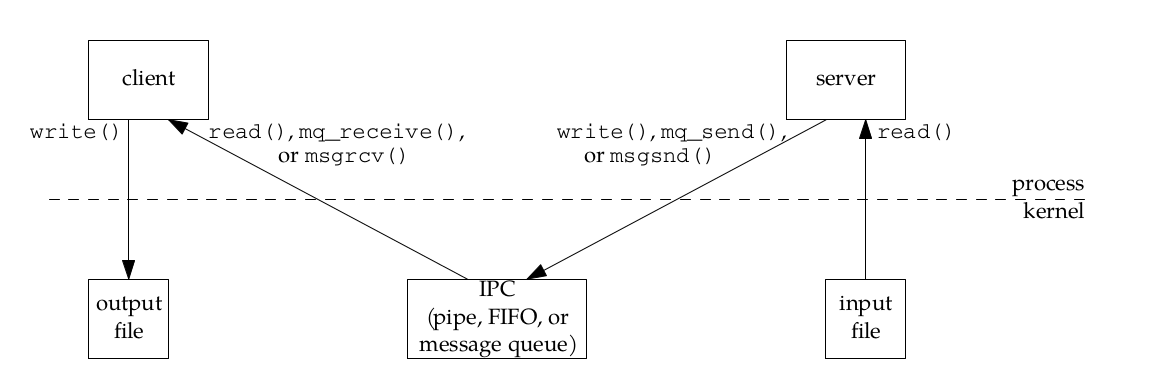
Here total of four copies of data are normally required. These four copies are done between kernel and a process which is expensive and time consuming.
The problems with these IPC (pipes,FIFO,message queue) is that for processes to exchange information , the information need go through the kernel.
Shared memory provides a way around this by letting two or more processes share a region of shared memory. Sharing a common piece of memory is simlar to sharing a disk file, such as the sequence number file used in all the file locking examples below in file locking chapter.
The following is some steps in shared memory mechanism.
Copying file data from server to client using shared memory.
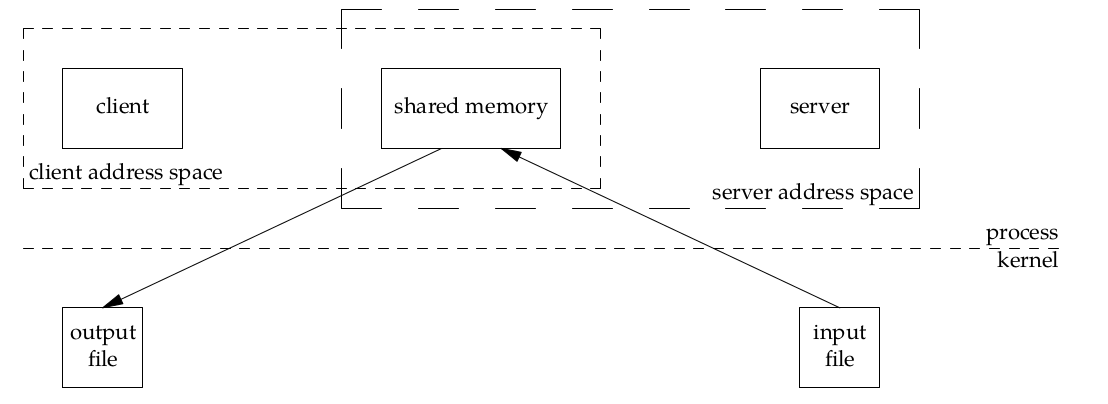
Here the data is copied only twice,from the inout file into the shared memory and from the shared memory to the output file. Share Memory object appears in the address space of both client and server.
In order to use the shared memory, we typically use the following steps:
Create the shared memory segment or use an already created shared memory segment (shmget())
Attach the process to the already created shared memory segment (shmat())
Detach the process from the already attached shared memory segment (shmdt())
Control operations on the shared memory segment (shmctl())
The shmget() system call creates a new shared memory segment or obtain the identifier of an existing segment.
#include <sys/types.h>
#include <sys/shm.h>

int shmget(key_t key , size_t size , int shmflg );
//Returns shared memory segment identifier on success, or –1 on error
The first argument, key, recognizes the shared memory segment. The key can be either an arbitrary value or one that can be derived from the library function ftok(). The key can also be IPC_PRIVATE, means, running processes as server and client (parent and child relationship) i.e., inter-related process communiation. If the client wants to use shared memory with this key, then it must be a child process of the server. Also, the child process needs to be created after the parent has obtained a shared memory.\
The second argument, size, is the size of the shared memory segment rounded to multiple of PAGE_SIZE.\
The third argument shmflg specifies the required shared memory flag/s like:\
IPC_CREAT: Create a new segment. If this flag is not used, then shmget() will find the segment associated with key and check to see if the user has permission to access the segment.\
IPC_EXCL: This flag is used with IPC_CREAT to ensure that this call creates the segment. If the segment already exists, the call fails.\
SHM_HUGETLB (since Linux 2.6): Allocate the segment using "huge pages." See the Linux kernel source file Documentation/admin-guide/mm/hugetlbpage.rst for further information.\
SHM_HUGE_2MB, SHM_HUGE_1GB (since Linux 3.8): Used in conjunction with SHM_HUGETLB to select alternative hugetlb page sizes (respectively, 2 MB and 1 GB) on systems that support multiple hugetlb page sizes.
The shmat() system call attaches the shared memory segment identified by shmid to the calling process’s virtual address space.
#include <sys/types.h>
#include <sys/shm.h>

void *shmat(int shmid , const void * shmaddr , int shmflg );
//Returns address at which shared memory is attached on success, or (void *) –1 on error
The first argument, shmid, is the identifier of the shared memory segment. This id is the shared memory identifier, which is the return value of shmget() system call
The second argument, shmaddr, is to specify the attaching address. If shmaddr is NULL, the system by default chooses the suitable address to attach the segment. If shmaddr is not NULL and SHM_RND is specified in shmflg, the attach is equal to the address of the nearest multiple of SHMLBA (Lower Boundary Address). Otherwise, shmaddr must be a page aligned address at which the shared memory attachment occurs/starts
The third argument, shmflg, specifies the required shared memory flag/s such as SHM_RND (rounding off address to SHMLBA) or SHM_EXEC (allows the contents of segment to be executed) or SHM_RDONLY (attaches the segment for read-only purpose, by default it is read-write) or SHM_REMAP (replaces the existing mapping in the range specified by shmaddr and continuing till the end of segment).
| Value | Description |
|---|---|
| SHM_RDONLY | Attach segment read-only |
| SHM_REMAP | Replace any existing mapping at shmaddr |
| SHM_RDN | Round shmaddr down to multiple of SHMLBA bytes |
Detaching the shared memory segment is not as same as deleting(using shmctl() IPC_RMID) it. A child created by fork() inherits its parent's attached shared memory segment.Thus, shared memory provides an easy method of IPC between parent and the child. During an exec(), all attached shared memory segments are detached. Shared memory segments are also automatically detached on process termination.
For detaching purpose we use shmdt() system call.
#include <sys/types.h>
#include <sys/shm.h>

int shmdt(const void *shmaddr)
//Return 0 on success adn ,-1 on failure
This system call detached the shared memory segment from the addres of the calling process. The argument, shmaddr, is the address of shared memory segment to be detached. The to-be-detached segment must be the address returned by the shmat() system call.
The shtctl() system call performs a range of control oprations on the shared memory segment identified by shmid.
#include <sys/types.h>
#include <sys/shm.h>

int shmctl(int shmid , int cmd , struct shmid_ds * buf );
//Returns 0 on success, or –1 on error
The first argument, shmid, is the identifier of the shared memory segment. This id is the shared memory identifier, which is the return value of shmget() system call
The second argument, cmd, is the command to perform the required control operation on the shared memory segment.
Valid values for cmd are −
IPC_STAT − Copies the information of the current values of each member of struct shmid_ds to the passed structure pointed by buf. This command requires read permission to the shared memory segment.
IPC_SET − Sets the user ID, group ID of the owner, permissions, etc. pointed to by structure buf.
IPC_RMID − Marks the segment to be destroyed. The segment is destroyed only after the last process has detached it.
IPC_INFO − Returns the information about the shared memory limits and parameters in the structure pointed by buf.
SHM_INFO − Returns a shm_info structure containing information about the consumed system resources by the shared memory.
The third argument, buf, is a pointer to the shared memory structure named struct shmid_ds. The values of this structure would be used for either set or get as per cmd.
This call returns the value depending upon the passed command. Upon success of IPC_INFO and SHM_INFO or SHM_STAT returns the index or identifier of the shared memory segment or 0 for other operations and -1 in case of failure.
A simple example to illustrate the use of shared memory for IPC.
Let us consider the following sample program.
Create two processes, one is for writing into the shared memory (sharedmemorywrite.c) and another is for reading from the shared memory (sharedmemoryread.c)
The program performs writing into the shared memory by write process (sharedmemorywrite.c) and reading from the shared memory by reading process (sharedmemoryread.c)
In the shared memory, the writing process, creates a shared memory of size 1K (and flags) and attaches the shared memory
The write process writes 1st argument supplied by the program into the shared memory segment.
Read process would read from the shared memory and write to the standard output
Reading and writing process actions are performed simultaneously
sharedmemorywrite.c
#include <sys/ipc.h>
#include <sys/shm.h>
#include <sys/types.h>

#include <stdio.h>
#include <stdlib.h>
#include <string.h>

#define SHM_SIZE 1024 //size of shared message. Can also make dynamic via malloc

int main(int argc, char **argv) {
	key_t key;
	int shmid;
	char *data;

	//long unsigned int SHM_SIZE;

	//long unsigned int *SHM_SIZEE = (long unsigned int*)malloc(1024);
	//long unsigned int SHM_SIZE = *SHM_SIZEE;


	if(argc == 2){
//making a common key file
	if ((key = ftok("sharedmemory.c", 'R')) == -1) {
		perror("ftok");
		exit(1);
	}

//create a shared memory
	if ((shmid = shmget(key, SHM_SIZE, 0644 | IPC_CREAT)) == -1) {
		perror("shmget");
		exit(1);
	}


//attach a process to shared memory segment
	data = shmat(shmid, (void *)0, 0);
	if (data == (char *)(-1)) {
		perror("shmat");
		exit(1);
	}
//copy the data to the shared memory segment 'data'
		printf("writing to segment: \"%s\"\n", argv[1]);
		strncpy(data, argv[1], SHM_SIZE);

//detach the proces from shared memory segment
	if (shmdt(data) == -1) {
		perror("shmdt");
		exit(1);
	}
	}
	else {
		fprintf(stderr, "usage: sharedmemorywrite [data_to_write]\n");
		exit(1);
	}
	return 0;
}
sharedmemoryread.c
#include <sys/ipc.h>
#include <sys/shm.h>
#include <sys/types.h>

#include <stdio.h>
#include <stdlib.h>
#include <string.h>

#define SHM_SIZE 1024 //size of shared message. Can also make dynamic via malloc

int
main(int argc, char **argv) {
	key_t key;
	int shmid;
	char *data;


//making a common key file
	if ((key = ftok("sharedmemory.c", 'R')) == -1) {
		perror("ftok");
		exit(1);
	}

//create a shared memory
	if ((shmid = shmget(key, SHM_SIZE, 0644 | IPC_CREAT)) == -1) {
		perror("shmget");
		exit(1);
	}


//attach a process to shared memory segment
	data = shmat(shmid, (void *)0, 0);
	if (data == (char *)(-1)) {
		perror("shmat");
		exit(1);
	}

//read the data from shared memory segment and print 'data'
	printf("segment contains: \"%s\"\n", data);
//detach the process from shared memory segment
	if (shmdt(data) == -1) {
		perror("shmdt");
		exit(1);
	}

	return 0;
}
Sample Output
Writing to Shared Memory
bash-5.0$ ./sharedmemorywrite "hello SharedMemory"
writing to segment: "hello SharedMemory"
Reading from Shared Memory
bash-5.0$ ./sharedmemoryread
segment contains: "hello SharedMemory"
A frequent application requirement is to read data from a file, make some change to that data, and then write it back to the file. As long as just one process at a time ever uses a file in this way, then there are no problems. However, problems can arise if multiple processes are simultaneously updating a file. If there is no synchronization mechanism this create the problem like race condition.
There are two types of locking mechanisms: mandatory and advisory. Mandatory systems will actually prevent read()s and write()s to file. Several Unix systems support them. Nevertheless, With an advisory lock system, processes can still read and write from a file while it's locked. Useless? Not quite, since there is a way for a process to check for the existence of a lock before a read or write. See, it's a kind of cooperative locking system. This is easily sufficient for almost all cases where file locking is necessary.
Apply or remove an advisory lock on an open file
#include <sys/file.h>
int flock(int fd , int operation );
//Returns 0 on success, or –1 on error
The flock() system call places a single lock on an entire file. The file to be locked is specified via an open file descriptor passed in fd. The operation argument specifies one of the values LOCK_SH , LOCK_EX , or LOCK_UN , which are described in table below. By default, flock() blocks if another process already holds an incompatible lock on a file. If we want to prevent this, we can **OR ( | ) **the value into operation. In this case, if another process already holds an incompatible lock on the file, flock() doesn’t block, but instead returns –1, with errno set to EWOULDBLOCK .
Table: Values for the operation argument of flock()
| Value | Description |
|---|---|
| LOCK_SH | Place a shared lock on the file referred to by fd |
| LOCK_EX | Place an exclusive lock on the file referred to by fd |
| LOCK_UN | Unlock the file referred to by fd |
| LOCK_NB | Make a nonblocking lock request |
Multiple processes may hold a shared lock, but in order to hold an exclusive lock, no other lock may exist, not even a shared lock. Think of a shared lock as a read lock ,multiple processes can simultaneously read from a given file without any problems and an exclusive lock as a write lock, where even a read operation might be corrupted by another process writing data at the same time. When LOCK_NB cannot establish a lock, this operation can be returned to the process without being blocked. Usually combined with LOCK_SH or LOCK_EX to do OR (|) combination.
Consider a two processes A and B. Below table shows the compatibility of flock()
| Process B/A | LOCK_SH | LOCK_EX |
|---|---|---|
| LOCK_SH | Yes | No |
| LOCK_EX | NO | NO |
Here LOCK_SH can be converted to LOCK_EX by calling another flock().
During conversion, the existing lock is first removed, and then a new lock is established. Between these two steps, another process’s pending request for an incompatible lock may be granted. If this occurs, then the conversion will block, or, if LOCK_NB was specified, the conversion will fail and the process will lose its original lock.
Blocking refers to operations that block further execution until that operation finishes while non-blocking refers to code that doesn’t block execution. Also note that intensive nonblocking (waiting...) may leads to starvation.
Example1. Shared lock can be achieved by both parallel processes but exclusive lock is thereafter gained by only one process.
#include <sys/file.h>
#include <errno.h>
#include <fcntl.h>
#include <stdio.h>
#include <stdlib.h>
#include <string.h>
#include <unistd.h>

//to print the progress
void progress() {
	for (int i=0; i < 10; i++) {
		/* Using write(2), because printf(3) is line-buffered. */
		    write(STDOUT_FILENO, ".", 1);
		sleep(1);
	}
}

int main(int argc, char **argv) {
	int i, fd, flags;

//file descriptor
	if ((fd = open("/tmp/tempfile", O_CREAT|O_RDWR, 0644)) == -1) {
		    fprintf(stderr, "Unable to open /tmp/tempfile: %s", strerror(errno));
		exit(EXIT_FAILURE);

	}
	//flag1 = LOCK_SH;
    //for shared lock
	if (strcmp(argv[1], "shared")==0){
	if (flock(fd, LOCK_SH) < 0) {
		perror("flocking");
		exit(EXIT_FAILURE);

	}

	printf("Shared lock established - sleeping for 10 seconds.\n");
	progress();
	printf("\nNow trying to get an exclusive lock.\n");
	}

	//flags = LOCK_EX;
    //for exclusive lock
	else if (strcmp(argv[1],"exclusive")==0) {
		//flags = LOCK_EX|LOCK_NB;
	}
	flags = LOCK_EX|LOCK_NB;//opening in non blocking mode
	for (i=0; i < 10; i++) {
		if (flock(fd, flags) < 0) {
			printf("Unable to get an exclusive lock.\n");
			if (i==9) {
				printf("Giving up all locks.\n");
				flock(fd, LOCK_UN);
				exit(EXIT_FAILURE);
                /* NOT TO HAVE THE DEADLOCK CONDITION */

			}
			sleep(1);
		} else {
			printf("Exclusive lock established.\n");
			break;
		}
	}

	progress();
	printf("\n");
	close(fd);
	exit(EXIT_SUCCESS);
}
For the 1st argument as 'shared' we establish the shared lock,we wait for 10sec to let another process try the same, then try to upgrade our shared lock to an exclusive lock.
For the 2nd argument as 'exclusive',we try to gain exclusive lock, we print a message on failure, then try again, but eventually giving up to avoid a deadlock scenario.
In the first shell we run a shared lock.


| Process name | time of creation | priority lock |
|---|---|---|
| P1 | t+0 | Initially take lock |
| P3 | t+1 | 2nd |
| P2 | t+2 | 1st |
Initially P1 holds the exclusive lock, when P1 is holding xlock process P3 and P2 are created one after another.Here the PID of P2< PID of P3 so P2 hold the xlock first then only P2. This may result in starvation of process P2 so to overcome this problem it waits for some time and givup eventually.
Using fcntl() we can place lock at any part of a file,ranging from the a single byte to the entire file.
#include <unistd.h>
#include <fcntl.h>

int fcntl(int fd, int cmd);
int fcntl(int fd, int cmd, long arg);
int fcntl(int fd, int cmd, struct flock *lock);
//Return on success depends on cmd, or –1 on error
Setting the lock consists of filling out a struct flock (declared in fcntl.h) that describes the types of lock needed,*open()*ing the file with the matching mode, and calling fcntl() with the proper arguments.
struct flock{
short l_type
short l_whence
off_t l_start
off_t l_len
off_t l_pid
}
struct flock fl;
int fd;

    fl.l_type   = F_WRLCK;      /*Lock type: F_RDLCK, F_WRLCK, F_UNLCK*/
    fl.l_whence = SEEK_SET;     /*How to interpret l_start: SEEK_SET, SEEK_CUR, SEEK_END */
    fl.l_start  = 0;            /* Offset from l_whence(the lock begins)*/
    fl.l_len    = 0;            /* length, 0 = to EOF .Number of bytes to lock; 0 means "until EOF" */
    fl.l_pid    = getpid();     /* our PID.Process preventing our lock (F_GETLK only) */

    fd = open("filename", O_WRONLY);

    fcntl(fd, F_SETLKW, &fl);    /*F_GETLK, F_SETLK, F_SETLKW */
Table: Lock types and corresponding open() modes.
| l_type | mode |
|---|---|
| F_RDLCK | O_RDONLY or O_RDWR |
| F_WRLCK | O_WRONLY or O_RDWR |
F_SETLKW:
This argument tells fcntl() to attempt to obtain the lock requested in the struct flock structure. If the lock cannot be obtained (since someone else has it locked already), fcntl() will wait (block) until the lock has cleared, then will set it itself. This is a very useful command. I use it all the time.
F_SETLK:
This function is almost identical to F_SETLKW. The only difference is that this one will not wait if it cannot obtain a lock. It will return immediately with -1. This function can be used to clear a lock by setting the l_type field in the struct flock to F_UNLCK.
F_GETLK:
Useful when only want to check if there is lock,but don't want to set. It looks through all the file locks until it finds one that conflicts with the lock specified in the struct flock. It then copies the conflicting lock's information into the struct and returns it to. If it can't find a conflicting lock, fcntl() returns the struct as passed it, except it sets the l_type field to F_UNLCK.
F_UNLCK is used to unlock the lock.
fl.l_type   = F_UNLCK;   /* tell it to unlock the region */
fcntl(fd, F_SETLK, &fl); /* set the region to unlocked */
Example:
#include<stdio.h>
#include<stdlib.h>
#include<unistd.h>
#include<errno.h>
#include<fcntl.h>

int main(int agrc, char *argv[]){
    struct flock flk = {F_WRLCK, SEEK_SET, 0,0,0};

    int fd;
    flk.l_pid = getpid();

    if(agrc > 1)
        flk.l_type = F_RDLCK;

    if((fd=open("linux_pr.c",O_RDWR)) == -1){
        perror("Error in opening the file!!\n");
        exit(0);
    }
    printf("press return to lock the file\n");
    getchar();

    printf("Checking if system can lock file or not \n");

    if(fcntl(fd, F_SETLKW,&flk) == -1){
        perror("fnctl error occured\n");
        exit(0);
    }

    printf("Lock successfully\n");

    printf("press return to unlock the file\n");
    getchar();

    flk.l_type = F_UNLCK;

        if(fcntl(fd, F_SETLK,&flk) == -1){
        perror("fnctl error occured\n");
        exit(0);
    }
    printf("Unlock successful\n");
    //exit(0);
    close(fd);
}
Output:
$ ./file_locking
Enter to lock the file

Checking if system can lock file or not
Lock successfully
hit enter to unlock the file

Unlock successful
When the program has read lock(argc >1), other instances of the program can get their own read lock.But when a write lock is obtained that other processes can't get a lock of any kind.(Relate readlock with shared lock and write lock with exclusive lock)
$ ./file_locking
Enter to lock the file

Checking if system can lock file or not
A process waiting to place a write lock be starved by a series of processes placing read locks on the same region? On Linux (as on many other UNIX implementations), a series of read locks can indeed starve a blocked write lock, possibly indefinitely.Locks implementaton can be done in FIFO order,priority based order.
Locks are:
non inherited across fork(2)
inherited across exec(2)
released upon exec(2) if closed-on-exec is set
relaesed if a process terminates
released if a filedescriptor (fd) is closed(!)
Files in a filesystem are globally visible data structures, so it is entirely possible that more than one process will try to modify the same file at the same time. In the absence of a way to coordinate the actions of those processes, the result will almost certainly be messy at best. One form of coordination is mandatory locking, which has been supported by Linux since nearly the beginning. A recent discussion, however, may be the beginning of the end for this venerable, if unloved, feature.
Mandatory locking is kernel enforced file locking, as opposed to the more usual cooperative file locking used to guarantee sequential access to files among processes.
Linux, like many other UNIX implementations, also allows fcntl() record locks to be mandatory. This means that every file I/O operation is checked to see whether it is compatible with any locks held by other processes on the region of the file on which I/O is being performed.
he operating system kernel would block attempts by a process to write to a file that another process holds a “read” -or- “shared” lock on, and block attempts to both read and write to a file that a process holds a “write ” -or- “exclusive” lock on.\
In order to use mandatory locking on Linux, we must enable it on the file system containing the files we wish to lock and on each file to be locked. We enable mandatory locking on a file system by mounting it with the (Linux-specific) -o mand option:
bash $ mount -o mand /dev/sda5 /mandtlocking_dir
Similarly, we can achieve same result by specifying the MS_MANDLOCK flag when calling mount(2).reference To check wether it is mand mount or not:
$ mount |grep sda5
 /dev/sda5 on /testfs type ext4 (rw,mand)
Mandatory locking is enabled on a file by the combination of having the set-group ID permission bit turned on and the group-execute permission turned off. This combination of permission bits was otherwise meaningless and unused in earlier UNIX implementations. In this way, later UNIX systems added mandatory locking without needing to change existing programs or add new system calls. From the shell, we can enable mandatory locking on a file as follows:
$ chmod g+s,g-s file
When displaying permissions for a file whose permission bits are set for mandatory locking, ls(1) displays an S in the group-execute permission column:
$ ls -l file
-rw-r-Sr-- 1 mtk users 0 Jun 22 19:44 file
Mandatory locks are inelegant, buggy, and subject to races on multiple operating systems. Furthermore, they have been that way for decades, and nobody has made the effort to fix them.
For more detail about mandatory locking follow the awesome article https://lwn.net/Articles/667210/
Note:The use of mandatory locks is best avoidable
We can explore the locks being held on system using the /proc/locks file. Display information about locks created bt both flock() and fcntl().
$ cat /proc/locks
1: POSIX  ADVISORY  WRITE 594688 08:07:5148107 0 EOF
2: POSIX  ADVISORY  WRITE 380470 08:07:4985998 1073741826 1073742335
9: POSIX  ADVISORY  READ  1641 08:07:4983447 128 128
15: FLOCK  ADVISORY  WRITE 412 00:15:14628 0 EOF
17: POSIX  ADVISORY  READ  594957 08:07:4988746 1073741826 1073742335
23: FLOCK  ADVISORY  WRITE 685 00:15:17178 0 EOF
The eight fields shown from left to right for each locks are as follows:
Alternatively we can explore lock being held on system using:
lslocks
Sockets are the methods of IPC that allows data to be exchanged between processes within same system of different system within a network.
For the client server communication:
Following table summarizes the characteristics of these above sockets domains. Table: Socket Domain
| Domain | Communication perform | Communication between applications | Address format | Address structure |
|---|---|---|---|---|
| AF_UNIX | within kernel | on same host | pathname | sockaddr_in |
| AF_INET | via IPV4 | on hosts connected via IPV4 network | 32-bit IPV4 address,16bit port numbers | sockaddr_in |
| AF_INET6 | via IPV6 | on hosts connected via IPV6 network | 128-bit IPV4 address,16bit port numbers | sockaddr_in6 |
Two type of sockets. Stream and Datagram(similar as virtual circuit and datagram in ipv4)\
| System call | Function |
|---|---|
| socket() | creates a new socket |
| bind() | binds a socket to IP address. Used by the server to bind the socket to well known port so that client can connect to it |
| listen() | accept incomming connections from other sockets |
| accept() | accepts the connection |
| connect() | establish a connection between sockets |
Socket I/O can be performed using the conventional read() and write() system calls, or using a range of socket-specific system calls (e.g., send(), recv(), sendto(), and recvfrom().Later discuss using example code . By default, these system calls block if the I/O operation can’t be completed immediately. Nonblocking I/O is also possible, by using the fcntl() F_SETFL operation to enable the O_NONBLOCK open file status flag.
socket() systemcall is used to create a socket.
#include<sys/socket.h>

int socket(int domain, int type, int protocol);
//Returns file descriptor in success and -1 on error
The first argument domain specifies the communication domain(AF_INET,AF_INET6) for the socket.Second argument type specifies the socket type(SOCK_STREAM, SOCK_DGRAM) and last argument protocol specifies protocol(always 0 for SOCK_STREAM and SOCK_DGRAM.)
bind() systemcall is used to bind the socket to ip and port
#incude<sys/socket.h>

int bind(int sockfd, const struct sockaddr *addr, socklen_t addrlen);
//Returns 0 on success and -1 on error
The argument sockfd is a file descriptor obtained from the system call to socket().addr argument is a pointer to a structure specifying the address to which this socket is to be bound.The type of structure passed in this argument depends on the socket domain. The addrlen argument specifies the size of the address structure.
In program we bind the socket to the well known port and ip address that is known to client to establish the connection.
System call as bind() are generic to all socket domains,they must be able to accept the address structure of any type(UNIX domain or Internet domain).In order to permit this, the sockets API defines a generic address structure, struct sockaddr. The only purpose for this type is to cast the various domain-specific address structures to a single type for use as arguments in the socket system calls. The sockaddr structure is typically defined as follows:
struct sockaddr {
sa_family_t sa_family; /* Address family (AF_* constant) */
char    sa_data[14]; /* Socket address (size varies according to socket domain) */
};
This is the template structure for all of the domain specific address structure.
Internet Domain Socket Addresses are IPv4 and IPv6.
Stored in sockaddr_in structure,defined in <netinet/in.h> header file.
 struct in_addr {                   //IPv4 4-byte address
     in_addr_t s_addr;              //Unsigned 32-bit interger
 };

 struct sockaddr_in {               //IPv4 socket address
     sa_family_t sin_family;        //Address family (AF_INET)
     in_port_r sin_port;            //Port number
     struct in_addr sin_addr;       //IPv4 address
     unsigned char __pad[x];        //Pad to size of 'sockaddr' structure (16-bytes)
 }
For the IPv6 IDS replace sin with sin6
An active socket is connected to a remote active socket via an open data connection.A passive socket is not connected, but rather awaits an incoming connection, which will spawn a new active socket once a connection is established.
In most application the server performs the passive open, and the client performs the active open.
Figure: Overview of system calls used with active and passive sockets:
Figure: Active-Passive socket system calls
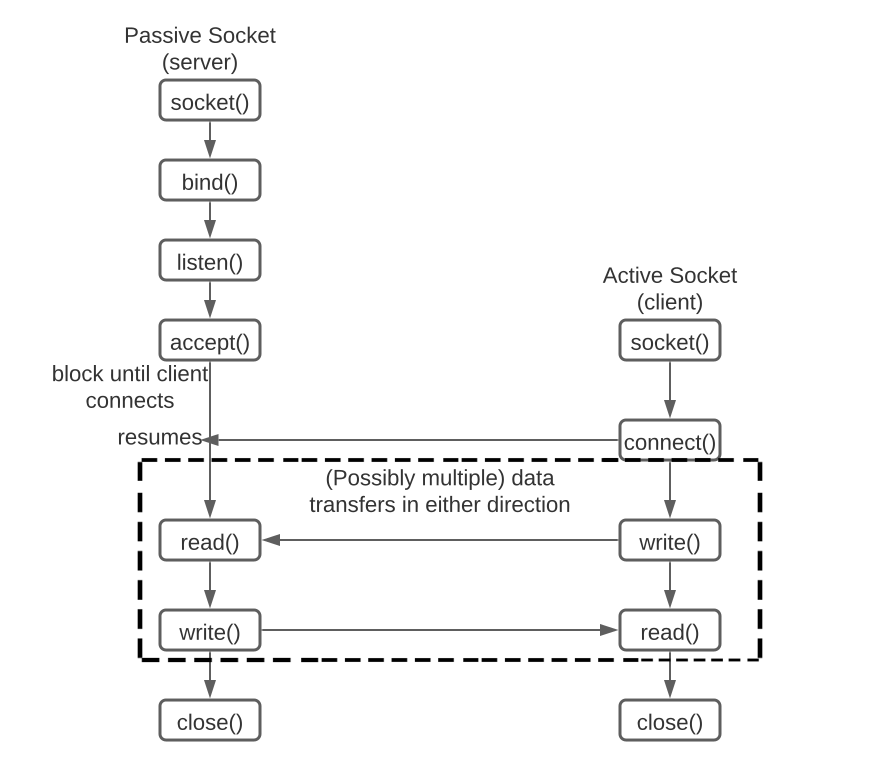
For the listening listen() systemcall is used. listen() marks the socket referred to by sockfd as a passive socket, that is, as a socket that will be used to accept incoming connection requests using accept(2).
#include <sys/socket.h>

int listen(int sockfd , int backlog );
//Returns 0 on success, or –1 on error
The argument sockfd is a file descriptor obtained from the system call to socket().
We can’t apply listen() to a connected socket—that is, a socket on which a connect() has been successfully performed or a socket returned by a call to accept().
The backlog argument defines the maximum length to which the queue of pending connections for sockfd may grow. If a connection request arrives when the queue is full, the client may receive an error with an indication of ECONNREFUSED or, if the underlying protocol suppor retransmission, the request may be ignored so that a later reattempt at connection succeeds.
Here a situation may aries when client calls connect() before the server calls accept(), this happens when server is busy handeling with other client(s).This result in pending connection illustrated as below figure.
Figure: pending socket connection
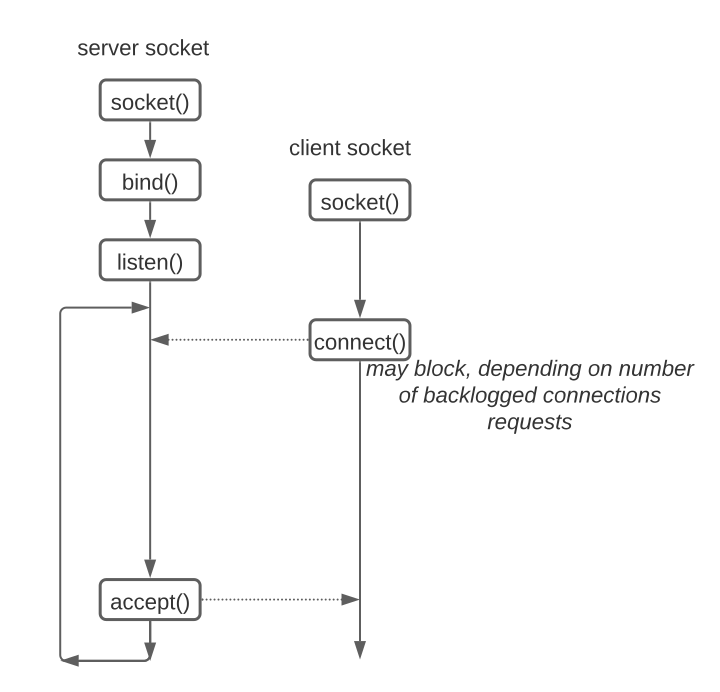
The kernel most record number of each pending requests so that a subsequent accept() can be processed. The backlog argument allows is to limit the number of such pending connections. Kernel should accept connection upto backlog limit(via accept()) and blocks until a pending connection is accepted(via accept()) and removed from the queue of pending connections.
accept() system call is used to accept as incoming connections on listening stream socket referred to by the file descriptor sockfd.If there are no pending connections when accept() system call is called, the call blocks until a connection request arrives.
#include <sys/socket.h>

int accept(int sockfd , struct sockaddr * addr , socklen_t * addrlen , int flags);
//Returns file descriptor on success, or –1 on error
It extracts the first connection request on the queue of pending connections for the listening socket, sockfd, creates a new connected socket, and returns a new file descriptor referring to that socket. accept() system call creates a new socket,and it is this new socket that is connected to the peer socket that performed the connect().
The listening socket (sockfd) remains open, and can be used to accept further connections but the newly created socket is not in the listening state.
The argument sockfd is a socket that has been created with socket(), bound to a local address with bind(), and is listening for connections after a listen(). The argument addr is a pointer to a sockaddr structure.This structure is filled in with the address of the peer socket, as known to the communications layer. The argument addrlen is a value-result argument.It points to an integer that, prior to the call, must be initialized to the size of the buffer pointed to by addr, so that the kernel knows how much space is available to return the socket address.
if no pending connections are present on the queue, and the socket is not marked as nonblocking,accept() blocks the caller until a connection is present. If the socket is marked nonblocking on pending connections are present on the queue, accept() fails with the error EAGAIN or EWOULDBLOCK.
For the flags see the man page for accept(2).
The connect() system call connects the socket referred to by the file descriptor sockfd to the address specified by addr.
#include <sys/socket.h>
int connect(int sockfd , const struct sockaddr * addr , socklen_t addrlen );

//Returns 0 on success, or –1 on error
The addrlen argument specifies the size of addr. The format of the address in addr is determined by the address space of the socket sockfd.
The argument sockfd is a file descriptor obtained from the system call to socket().addr argument is a pointer to a structure specifying the address to which this socket is to be bound.The type of structure passed in this argument depends on the socket domain. The addrlen argument specifies the size of the address structure.
If the socket sockfd is of type SOCK_DGRAM, then addr is the address to which datagrams are sent by default, and the only address from which datagrams are received. If the socket is of type SOCK_STREAM or SOCK_SEQPACKET, this call attempts to make a connection to the sock that is bound to the address specified by addr.
Below figure shows stream bidirectional communication:
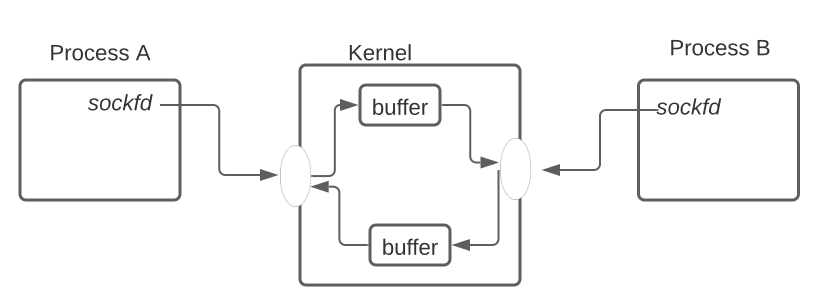 Figure: Bidirectional connection stream socket
To perform i/o oprations, read() and write() system call or send() and recv() system calls is use.For terminating socket, close() system call is use.
recv() and send() system calls perform receiving and sending data from the socket.
#include <sys/socket.h>

ssize_t recv(int sockfd , void * buffer , size_t length , int flags );
//Returns number of bytes received, 0 on EOF, or –1 on error

ssize_t send(int sockfd , const void * buffer , size_t length , int flags );
//Returns number of bytes sent, or –1 on error
If a message is too long to fit in the supplied buffer, excess bytes may be discarded depending on the type of socket the message is received from.
The last argument, flags, is a bit mask that modifies the behavior of the I/O operation. For recv(), the bits that may be ORed in flags include the following:
| Flags | Description |
|---|---|
| MSG_DONTWAIT | Perform a nonblocking recv().If no data is available, then instead of blocking, return immediately with the error EAGAIN . |
| MSG_OOB | Receive out-of-band data on the socket |
| MSG_PEEK | Retrieve a copy of the request bytes from the socket buffer,but don't actually remove them from the buffer. The data can later be reread by another read() system call |
| MSG_DONTWAIT | Perform a nonblocking send(). |
The send(2) and recv(2) manual pages describe further flags that we don’t cover here.
We sometimes make direct use of integer constants for IP addresses and port numbers. For example, we may choose to hard-code a port number into our program,or use constants such as INADDR_ANY and INADDR_LOOPBACK when specifying an IPv4 address. These values are represented in C according to the conventions of the host machine, so they are in host byte order. We must convert these values to network byte order before storing them in socket address structures.
The htons(), htonl(), ntohs(), and ntohl() functions are defined (typically as macros) for converting integers in either direction between host and network byte order.
#include <arpa/inet.h>
uint16_t htons(uint16_t host_uint16 );
//Returns host_uint16 converted to network byte order

uint32_t htonl(uint32_t host_uint32 );
//Returns host_uint32 converted to network byte order

uint16_t ntohs(uint16_t net_uint16 );
//Returns net_uint16 converted to host byte order

uint32_t ntohl(uint32_t net_uint32 );
//Returns net_uint32 converted to host byte order
System represents IP addresses and port numbers in binary form. For the good way of understanding between system and user, we need to convert human readable IP addresses and ports to system readable and vice versa.
The inet_aton() and inet_ntoa() functions convert IP addresses between dotted decimal notation and binary form (network byte order) and binary form to human readable dotted string form respectively.
#include <arpa/inet.h>
int inet_aton(const char * str , struct in_addr * addr );

//Returns 1 (true) if str is a valid dotted-decimal address, or 0 (false) on error
The inet_aton() (“ASCII to network”) function converts the dotted-decimal string pointed to by str into an IPv4 address in network byte order, which is returned in the in_addr structure pointed to by addr.
The inet_ntoa() performs the converse of inet_aton().
#include<arpa/inet.h>
char *inet_ntoa(struct in_addr addr);

//Returns pointer to dotted-decimal string version of *addr*
Given an in_addr structure (a 32-bit IPv4 address in network byte order), inet_ntoa() returns a pointer to a (statically allocated) string containing the address in dotted decimal notation.
These functions are nowadays made obsolete by inet_pton() and inet_ntop().
These functions can convert IPv4 and IPv6 addresses from text to binary and vice versa.
#include <arpa/inet.h>

int inet_pton(int af, const char *src_str, void *dst);
//Returns 1 on successful,0 if src_str is not in presentation format, -1 on error

const char *inet_ntop(int af, const void *src, char *dst_str, socklen_t size);
//Returns pointer to dst, -1 on error
inet_pton() system call converts the character string src into a network address structure in the af address family(domain),then copies the network address structure to dst. The af argument must be either AF_INET or AF_INET6. dst is written in network byte order.
inet_ntop() system call converts the network address structure src in the af address family into a character string. The resulting string is copied to the buffer pointed to by dst_str, which must be a non-null pointer. The caller specifies the number of bytes available in this buffer in the argument size.
Here, p in inet_pton() represents presentation and n in inet_ntop() respresents network.
These system calls are used to access or to change the hostname of the current processor.
#include <unistd.h>

int gethostname(char *name, size_t len);
int sethostname(const char *name, size_t len);
sethostname() sets the hostname to the value given in the character array name. The len argument specifies the number of bytes in name(i.e sizeof(name)).
gethostname() returns the null-terminated hostname in the character array name, which has a length of len bytes(i.e sizeof(name)). If the
The inet_addr() function converts the Internet host address cp from IPv4 numbers-and-dots notation into binary data in network byte order.
#include<arpa/inet.h>
in_addr_t inet_addr(const char * str);
If the input is invalid, INADDR_NONE (usually -1) is returned. Use of this function is problematic because -1 is a valid address(255.255.255.255).Avoid its use in favor of inet_aton(), inet_pton(3), or getaddrinfo(3), which provide a cleaner way to indicate error return.
Given a host name and a service name, getaddrinfo() returns a list of socket address structures, each of which contains an IP address and port number.
#include <sys/socket.h>
#include <netdb.h>
int getaddrinfo(const char * host , const char * service ,const struct addrinfo * hints , struct addrinfo ** result );
//Returns 0 on success, or nonzero on error
We use close() system call for closing a socket connection.
#include <unistd.h>

int close(int *sockfd*);
//Return 0 on success, -1 on error
close() system call closes both halves of the bidirectional communication channel. In some situation, it is useful to close on half of the bidirectional connection, so that data can be transmitted in just one direction through the socket.shutdown() system call provides these function.
#include <sys/socket.h>

int shutdown(int sockfd , int how );
//Returns 0 on success, or –1 on error
shut down part of a full-duplex connection
The shutdown() call causes all or part of a full-duplex connection on the socket associated with sockfd to be shut down. If how is SHUT_RD, further receptions will be disallowed. If how is SHUT_WR, further transmissions will be disallowed. If how is SHUT_RDWR, further receptions and transmission will be disallowed.